如何在Python中使用NVIDIA Canary-1B-v2進行語音識別、翻譯及自動SRT字幕匯出
重點摘要
本教學將使用NVIDIA Canary-1B-v2建構一套語音識別與翻譯工作流程。首先安裝所需的音訊、NeMo、NumPy與SciPy相依套件,並在啟用GPU的執行環境中載入Canary模型以進行高效推論。接著將音訊整理為乾淨的16kHz單聲道格式,執行英文語音識別、將語音翻譯成多種語言、產生逐字與分段時間戳記、將翻譯後的字幕匯出為SRT檔案、測試長段落轉錄、進行批次處理,並對推論速度進行基準測試。最終我們將獲得一套完整的多語言語音識別與語音翻譯管道,可應用於真實音檔、字幕生成及大規模轉錄實驗。
In this tutorial, we build a speech recognition and translation workflow using NVIDIA Canary-1B-v2. We begin by setting up the required audio, NeMo, NumPy, and SciPy dependencies, then load the Canary model on a GPU-enabled runtime for efficient inference. From there, we prepare audio into a clean 16 kHz mono format, perform English ASR, translate speech into multiple languages, generate word and segment timestamps, export translated subtitles as an SRT file, test long-form transcription, run batch processing, and benchmark inference speed. At the end, we have a complete multilingual ASR and speech translation pipeline that we can adapt for real audio files, subtitle generation, and large-scale transcription experiments. Installing NeMo, Audio Libraries, NumPy, and SciPy Dependencies Copy CodeCopiedUse a different Browserimport os, subprocess, sys SENTINEL = "/content/.canary_setup_done" if not os.path.exists(SENTINEL): def sh(c): print("$", c); subprocess.run(c, shell=True, check=False) print(">>> PHASE 1: installing dependencies (one-time)...\n") sh("apt-get -qq update") sh("apt-get -qq install -y libsndfile1 ffmpeg > /dev/null") sh('pip install -q "nemo_toolkit[asr]"') sh("pip install -q librosa soundfile pydub") sh('pip install -q --force-reinstall --no-cache-dir "numpy>=2.2,<2.4" "scipy>=1.15"') open(SENTINEL, "w").write("done") print("\n Setup complete. Restarting the runtime now.") print(" When it reconnects, RUN THIS CELL AGAIN to start the tutorial.") os.kill(os.getpid(), 9) We set up the environment for the NVIDIA Canary-1B-v2 tutorial. We install the required system packages, NeMo ASR toolkit, audio libraries, and compatible NumPy and SciPy versions. We then create a setup marker and restart the runtime so that the updated dependencies load cleanly before running the main tutorial. Loading NVIDIA Canary-1B-v2 and Checking GPU Availability Copy CodeCopiedUse a different Browserimport time, json, gc, math, urllib.request import torch, numpy as np, soundfile as sf, librosa print(">>> PHASE 2: running tutorial\n") print("NumPy:", np.__version__, "| PyTorch:", torch.__version__) print("CUDA available:", torch.cuda.is_available()) if torch.cuda.is_available(): print("GPU:", torch.cuda.get_device_name(0), f"| VRAM: {torch.cuda.get_device_properties(0).total_memory/1e9:.1f} GB") else: print(" No GPU — will run on CPU (very slow). " "Set Runtime > Change runtime type > GPU.") DEVICE = "cuda" if torch.cuda.is_available() else "cpu" LANGS = { "bg":"Bulgarian","hr":"Croatian","cs":"Czech","da":"Danish","nl":"Dutch", "en":"English","et":"Estonian","fi":"Finnish","fr":"French","de":"German", "el":"Greek","hu":"Hungarian","it":"Italian","lv":"Latvian","lt":"Lithuanian", "mt":"Maltese","pl":"Polish","pt":"Portuguese","ro":"Romanian","sk":"Slovak", "sl":"Slovenian","es":"Spanish","sv":"Swedish","ru":"Russian","uk":"Ukrainian", } print(f"\nSupported languages ({len(LANGS)}):", ", ".join(LANGS.keys())) from nemo.collections.asr.models import ASRModel print("\nLoading nvidia/canary-1b-v2 ...") t0 = time.time() asr_model = ASRModel.from_pretrained(model_name="nvidia/canary-1b-v2").to(DEVICE).eval() print(f"Model loaded in {time.time()-t0:.1f}s") We import the main libraries and check whether CUDA is available for GPU acceleration. We define the supported language dictionary to enable Canary to handle multilingual ASR and translation tasks. We then load the NVIDIA Canary-1B-v2 model from NeMo and move it to the available device for inference. Preparing 16 kHz Audio and Running English ASR with Translation Copy CodeCopiedUse a different BrowserTARGET_SR = 16000 def prepare_audio(path_or_url, out_path=None): if str(path_or_url).startswith(("http://", "https://")): local = "/content/_dl_" + os.path.basename(path_or_url.split("?")[0]) urllib.request.urlretrieve(path_or_url, local) path_or_url = local audio, _ = librosa.load(path_or_url, sr=TARGET_SR, mono=True) if out_path is None: base = os.path.splitext(os.path.basename(path_or_url))[0] out_path = f"/content/{base}_16k_mono.wav" sf.write(out_path, audio, TARGET_SR, subtype="PCM_16") dur = len(audio) / TARGET_SR print(f"Prepared: {out_path} ({dur:.1f}s, 16kHz, mono)") return out_path, dur SAMPLE_URL = "https://dldata-public.s3.us-east-2.amazonaws.com/2086-149220-0033.wav" sample_wav, sample_dur = prepare_audio(SAMPLE_URL) def transcribe(files, source_lang="en", target_lang="en", timestamps=False, batch_size=1): if isinstance(files, str): files = [files] return asr_model.transcribe(files, source_lang=source_lang, target_lang=target_lang, timestamps=timestamps, batch_size=batch_size) print("\n=== 1) BASIC ASR (English) ===") res = transcribe(sample_wav, source_lang="en", target_lang="en") print("Transcript:", res[0].text) print("\n=== 2) TRANSLATION (EN audio -> X) ===") for tgt in ["fr", "de", "es", "it"]: out = transcribe(sample_wav, source_lang="en", target_lang=tgt) print(f" EN -> {LANGS[tgt]:<10} ({tgt}): {out[0].text}") We create a reusable audio preparation function that downloads audio when needed and converts it into 16 kHz mono WAV format. We load the sample audio file and define a helper function for transcription and translation. We then run basic English ASR and translate the same English speech into French, German, Spanish, and Italian. Generating Word and Segment Timestamps and Exporting SRT Subtitles Copy CodeCopiedUse a different Browserprint("\n=== 3) TIMESTAMPS (ASR) ===") ts_out = transcribe(sample_wav, source_lang="en", target_lang="en", timestamps=True) word_ts = ts_out[0].timestamp.get("word", []) seg_ts = ts_out[0].timestamp.get("segment", []) print("Segments:") for s in seg_ts: print(f" [{s['start']:6.2f}s - {s['end']:6.2f}s] {s['segment']}") print("First 10 words:") for w in word_ts[:10]: print(f" [{w['start']:6.2f}s - {w['end']:6.2f}s] {w['word']}") def _srt_time(t): h=int(t//3600); m=int((t%3600)//60); s=int(t%60); ms=int(round((t-int(t))*1000)) return f"{h:02d}:{m:02d}:{s:02d},{ms:03d}" def segments_to_srt(segments, out_path="/content/output.srt"): lines=[] for i, seg in enumerate(segments, 1): lines += [str(i), f"{_srt_time(seg['start'])} --> {_srt_time(seg['end'])}", seg["segment"].strip(), ""] open(out_path, "w", encoding="utf-8").write("\n".join(lines)) print(f"Saved SRT: {out_path}") return out_path print("\n=== 4) SRT EXPORT (translated French subtitles) ===") fr_ts = transcribe(sample_wav, source_lang="en", target_lang="fr", timestamps=True) segments_to_srt(fr_ts[0].timestamp["segment"], "/content/subtitles_fr.srt") print(open("/content/subtitles_fr.srt").read()) We enable timestamped transcription to extract both segment-level and word-level timing information. We print the transcript segments and the first few word timestamps to inspect how the model aligns text with audio. We also convert translated French segments into an SRT subtitle file and display the generated subtitles. Running Long-Form Transcription, Batch Processing, and Speed Benchmark Copy CodeCopiedUse a different Browserprint("\n=== 5) LONG-FORM (sample tiled x6) ===") long_audio, _ = librosa.load(sample_wav, sr=TARGET_SR, mono=True) long_audio = np.tile(long_audio, 6) sf.write("/content/long.wav", long_audio, TARGET_SR, subtype="PCM_16") print(f"Long clip duration: {len(long_audio)/TARGET_SR:.1f}s") long_out = transcribe("/content/long.wav", source_lang="en", target_lang="en", batch_size=1) print("Long transcript (first 300 chars):", long_out[0].text[:300], "...") print("\n=== 6) BATCH ===") for name in ["clip_a", "clip_b"]: sf.write(f"/content/{name}.wav", librosa.load(sample_wav, sr=TARGET_SR, mono=True)[0], TARGET_SR, subtype="PCM_16") batch = transcribe(["/content/clip_a.wav", "/content/clip_b.wav"], source_lang="en", target_lang="en", batch_size=2) for i, b in enumerate(batch): print(f" file {i}: {b.text}") print("\n=== 7) BENCHMARK ===") t0 = time.time(); _ = transcribe(sample_wav, source_lang="en", target_lang="en") elapsed = time.time()-t0 print(f"Audio: {sample_dur:.2f}s | Compute: {elapsed:.2f}s | RTF
Related
相關文章

雲計算一哥,讓小鵬、Kimi和獵豹都爽了一把
這篇消息聚焦「雲計算一哥,讓小鵬、Kimi和獵豹都爽了一把」。原始導語提到:Agentic AI爆發的拐點已然來臨 從 AI 情報角度來看,這類內容值得關注其背後的技術進展、產品落地、產業競爭與後續市場影響。
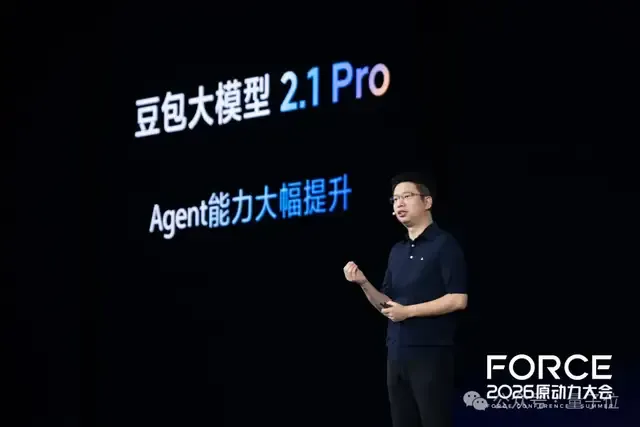
剛剛,豆包2.1發佈!Agent自己跑18個小時搞定芯片設計代碼
這篇消息聚焦「剛剛,豆包2.1發佈!Agent自己跑18個小時搞定芯片設計代碼」。原始導語提到:編程比肩Opus 4.7 從 AI 情報角度來看,這類內容值得關注其背後的技術進展、產品落地、產業競爭與後續市場影響。

當AI智能體走進伊利一線服務,導購和達人營銷有了新解法
這篇消息聚焦「當AI智能體走進伊利一線服務,導購和達人營銷有了新解法」。原始導語提到:面對越來越專業的消費者,伊利把AI智能體放進導購、社群、達人營銷等快消一線場景,藉助騰訊雲智能體開發平臺ADP 從 AI 情報角度來看,這類內容值得關注其背後的技術進展、產品落地、產業競爭與後續市場影響。

QQ 郵箱 Agently Mail 目前支持 OpenClaw 等主流 Agent,騰訊張軍稱後續會開放更多平臺
騰訊 QQ 郵箱推出專為 AI 智能體設計的 Agently Mail 服務,目前支援 WorkBuddy、OpenClaw、豆包超能模式等主流 Agent。騰訊公關總監張軍表示,後續將持續開放更多平台。

Loop Engineering 火了:AI Agent 開始自己幹活,公司準備好背鍋了嗎?
Loop Engineering 近期引發關注,其核心在於重新定義產品、測試、研發與專案管理之間的權責界線。隨著 AI Agent 開始自主執行任務,企業必須正視責任歸屬問題,提前做好風險應對準備。
利用 CUGA 打造真正的代理應用:輕量框架上的 24 個實作範例
建構一個代理大多涉及管線工作:工具、狀態、護欄、從單一代理擴展到多個代理。CUGA(pip install cuga),全名為可配置通用代理(Configurable Generalist Agent),是 IBM 為企業打造的代理框架,能處理這些繁瑣環節,讓你只需撰寫工具清單與提示詞。我們建構了 24 個單一檔案應用來證明這一點。本文將完整介紹其中一個應用,並展示相同的代理如何在生產環境中以主權治理的方式運作。