Developing an End-to-End Document Intelligence Pipeline with docTR for OCR, Layout Analysis, KIE, Benchmarking, and Searchable PDFs
In this tutorial, we develop an end-to-end OCR workflow with docTR and explore how modern document understanding pipelines combine text detection, recognition, geometry, layout analysis, structured extraction, and export.
We generate realistic synthetic invoice documents, load images and PDFs through DocumentFile, construct GPU-aware OCR predictors, and benchmark different detection–recognition architecture combinations for speed and accuracy.
We then inspect the internal Document hierarchy, visualize confidence-aware bounding boxes, use standalone detection and recognition models, implement two-pass recognition for low-confidence words, tune detection thresholds, and introduce custom pipeline hooks for box filtering and padding.
We also handle rotated and skewed documents, experiment with layout detection and KIE, reconstruct reading order and tabular information, extract structured invoice fields, and export results as text, JSON, hOCR, synthesized document images, and searchable PDFs.
Finally, we examine practical performance, fine-tuning, batching, and deployment considerations to understand how to move from a basic OCR example to a production-oriented document intelligence pipeline.
Copy CodeCopiedUse a different Browserimport os, sys, io, json, time, math, re, subprocess, warnings from collections import Counter, defaultdict warnings.filterwarnings("ignore") os.environ.setdefault("USETORCH", "1") def pip(pkgs): subprocess.run([sys.
executable, "-m", "pip", "install", "-q", pkgs], check=False) try: import doctr except ImportError: print(">> Installing python-doctr (this takes ~1-2 min on Colab)...
") pip("python-doctr[viz]") try: import reportlab except ImportError: pip("reportlab") import numpy as np import torch import matplotlib import matplotlib.pyplot as plt from matplotlib import fontmanager from matplotlib.
patches import Rectangle, Polygon as MplPolygon from PIL import Image, ImageDraw, ImageFont import doctr from doctr.io import DocumentFile from doctr.models import ( ocrpredictor, kiepredictor, detectionpredictor, recognitionpredictor, ) DEVICE = "cuda" if torch.cuda.
isavailable() else "cpu" print("=" 78) print(f"docTR : {doctr.version}") print(f"torch : {torch.version}") print(f"device : {DEVICE}" + (f" ({torch.cuda.getdevicename(0)})" if DEVICE == "cuda" else "")) print(f"python : {sys.version.
split()[0]}") print("=" 78) print("NOTE: if the import above failed, restart the runtime " "(Runtime > Restart session) and re-run this cell.
\n") CFG = dict( RUNBENCHMARK = True, RUNSECONDPASS = True, RUNROTATION = True, RUNLAYOUT = True, RUNKIE = True, RUNSYNTHESIS = True, RUNPDFEXPORT = True, ) WORK = "/content/doctrdemo" if os.path.isdir("/content") else "./doctrdemo" os.
makedirs(WORK, existok=True) print(f"working dir: {WORK}\n") FONT = fontmanager.findfont(fontmanager.FontProperties(family="DejaVu Sans")) FONTB = fontmanager.findfont( fontmanager.
FontProperties(family="DejaVu Sans", weight="bold")) A4 = (1240, 1754) INVOICELINES = [ ( 80, 70, "NORTHWIND TRADING CO.
", 38, True ), ( 80, 122, "42 Harbour Road, Bristol BS1 5TY", 22, False), ( 80, 152, "VAT GB 884 5521 09", 22, False), (820, 70, "INVOICE", 44, True ), (820, 132, "Invoice No: INV-2024-00817", 22, False), (820, 162, "Date: 14/03/2024", 22, False), (820, 192, "Due Date: 13/04/2024", 22, False), ( 80, 260, "BILL TO", 24, True ), ( 80, 296, "Aurora Robotics Ltd", 24, False), ( 80, 328, "Unit 7 Fenway Business Park", 22, False), ( 80, 358, "Cambridge CB4 0WS", 22, False), ( 80, 388, "Contact: procurement@aurorarobotics.
co.uk",22, False), ( 80, 470, "DESCRIPTION", 24, True ), (640, 470, "QTY", 24, True ), (780, 470, "UNIT PRICE", 24, True ), (1010,470, "AMOUNT", 24, True ), ( 80, 520, "Servo controller board Rev C", 22, False), (640, 520, "12", 22, False), (780, 520, "84.50", 22, False), (1010,520, "1014.
00", 22, False), ( 80, 560, "Harmonic drive gearbox 50:1", 22, False), (640, 560, "4", 22, False), (780, 560, "312.75", 22, False), (1010,560, "1251.00", 22, False), ( 80, 600, "Shielded encoder cable 2m", 22, False), (640, 600, "20", 22, False), (780, 600, "11.40", 22, False), (1010,600, "228.
00", 22, False), ( 80, 640, "Calibration service on-site", 22, False), (640, 640, "1", 22, False), (780, 640, "450.00", 22, False), (1010,640, "450.00", 22, False), (780, 720, "Subtotal", 22, False), (1010,720, "2943.00", 22, False), (780, 756, "VAT 20%", 22, False), (1010,756, "588.
60", 22, False), (780, 796, "TOTAL DUE", 26, True ), (1010,796, "3531.60", 26, True ), ( 80, 900, "PAYMENT TERMS", 24, True ), ( 80, 936, "Net 30 days.Late payments accrue interest at 2% per month.
", 20, False), ( 80, 968, "Bank: Lloyds Sort Code: 30-96-26 Account: 41775302", 20, False), ( 80,1010, "Reference: INV-2024-00817", 20, False), ] PAGE2LINES = [ ( 80, 70, "APPENDIX A - DELIVERY SCHEDULE", 34, True ), ( 80, 140, "All shipments leave the Bristol warehouse before 16:00 GMT.
", 22, False), ( 80, 176, "Tracking numbers are emailed on the day of dispatch.
", 22, False), ( 80, 240, "MILESTONE", 24, True ), (700, 240, "TARGET DATE", 24, True ), ( 80, 288, "Purchase order acknowledged", 22, False), (700, 288, "18/03/2024", 22, False), ( 80, 328, "Controller boards shipped", 22, False), (700, 328, "25/03/2024", 22, False), ( 80, 368, "Gearboxes shipped", 22, False), (700, 368, "02/04/2024", 22, False), ( 80, 408, "On-site calibration window", 22, False), (700, 408, "08/04/2024", 22, False), ( 80, 480, "Questions?
Call +44 117 496 0022 or email [email protected]", 20, False), ] def renderpage(lines, size=A4, bg=250): """Draw a clean document page from a list of (x, y, text, size, bold).""" img = Image.new("RGB", size, (bg, bg, bg)) d = ImageDraw.
Draw(img) for x, y, text, sz, bold in lines: font = ImageFont.truetype(FONTB if bold else FONT, sz) d.text((x, y), text, fill=(18, 18, 22), font=font) d.line([(80, 455), (1160, 455)], fill=(60, 60, 60), width=2) d.line([(80, 505), (1160, 505)], fill=(160, 160, 160), width=1) d.
line([(760, 700), (1160, 700)], fill=(60, 60, 60), width=2) return img def scanify(img, angle=0.0, noise=6.0, jpegquality=72, blurshadow=True): """Degrade a clean render so it behaves like a phone photo / flatbed scan.""" if angle: img = img.rotate(angle, expand=True, resample=Image.
BICUBIC, fillcolor=(250, 250, 250)) arr = np.asarray(img).astype(np.float32) if blurshadow: h, w = arr.shape[:2] gx = np.linspace(-1, 1, w)[None, :] gy = np.linspace(-1, 1, h)[:, None] shade = 1.0 - 0.10 (gx 2 + 0.6 gy 2) arr *= shade[..., None] if noise: arr += np.random.normal(0, noise, arr.
shape) arr = np.clip(arr, 0, 255).astype(np.uint8) out = Image.fromarray(arr) if jpegquality: buf = io.BytesIO() out.save(buf, format="JPEG", quality=jpegquality) buf.seek(0) out = Image.open(buf).
convert("RGB") return out clean1 = renderpage(INVOICELINES) clean2 = renderpage(PAGE2LINES) page1path = os.path.join(WORK, "invoicep1.png") page2path = os.path.join(WORK, "invoicep2.png") rotatedpath = os.path.join(WORK, "invoicerotated.png") pdfpath = os.path.join(WORK, "invoice.
pdf") scanify(clean1, angle=0.4).save(page1path) scanify(clean2, angle=-0.3).save(page2path) scanify(clean1, angle=13.0, noise=8.0).save(rotatedpath) clean1.save(pdfpath, saveall=True, appendimages=[clean2], resolution=150) GTWORDSP1 = [w for , , t, , in INVOICELINES for w in t.
split()] print(f"generated: {page1path}, {page2path}, {rotatedpath}, {pdfpath}") print(f"ground-truth words on page 1: {len(GTWORDSP1)}\n") fig, ax = plt.subplots(1, 3, figsize=(15, 7)) for a, im, t in zip(ax, [Image.open(page1path), Image.open(page2path), Image.
open(rotatedpath)], ["page 1 (scanified)", "page 2", "rotated 13 deg"]): a.imshow(im); a.settitle(t, fontsize=10); a.axis("off") plt.tightlayout(); plt.show() imgsdoc = DocumentFile.fromimages([page1path, page2path]) pdfdoc = DocumentFile.frompdf(pdfpath) pdfhi = DocumentFile.
frompdf(pdfpath, scale=3) rotdoc = DocumentFile.f
Related
相關文章
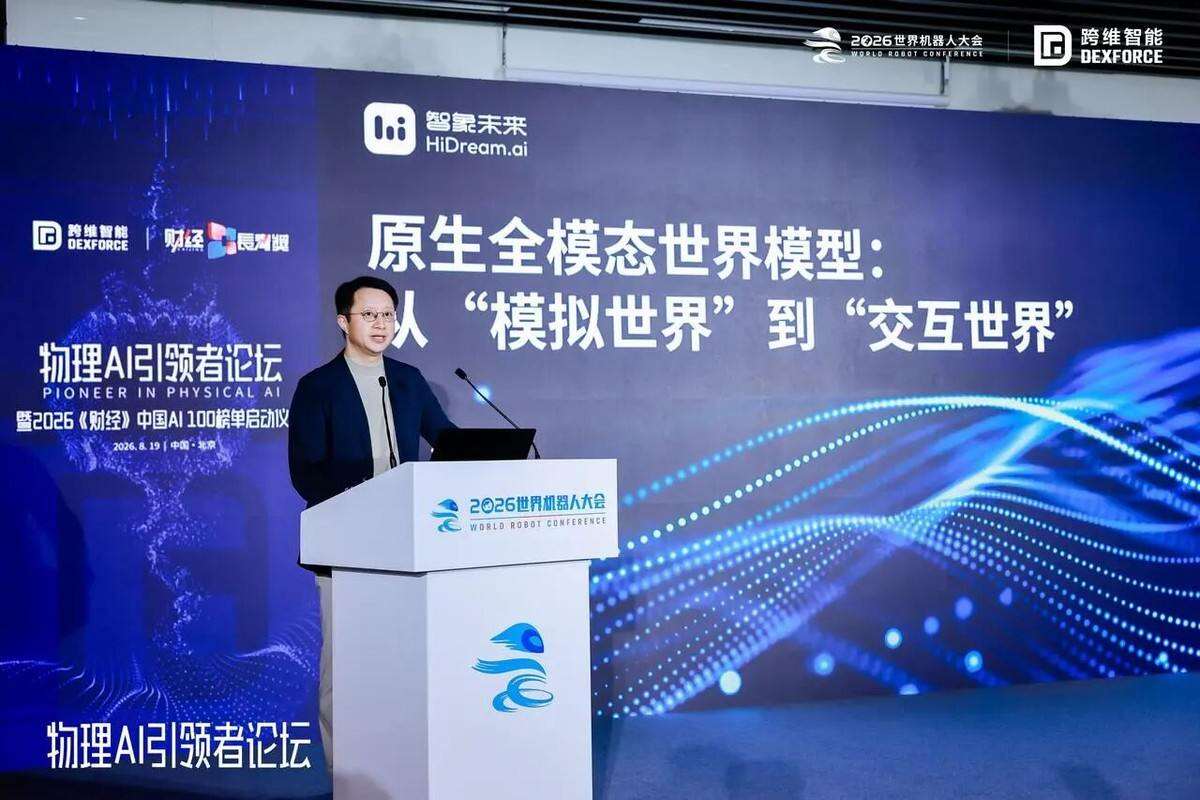
WRC 2026|原生全模態世界模型:從模擬世界到交互世界
世界機器人大會期間,智象未來創辦人梅濤於「物理AI引領者論壇」發表演講,提出原生全模態世界模型從「模擬世界」走向「交互世界」的觀點。他強調即使AI模型智商接近140,高IQ不代表全能,需具備在真實物理世界中穩定完成任務的能力,此為Physical AI發展的關鍵。論壇聚焦通用物理智慧的技術演進與產業路徑,匯聚眾多專家參與。

阿里巴巴達摩院推出肝癌 AI 模型:可精準識別 1 釐米微小腫瘤
作者:遠洋 責編:遠洋 評論: 感謝網友 HH_KK 的線索投遞!8 月 24 日消息,阿里巴巴達摩院聯合中國醫科大學附屬盛京醫院等機構研發出肝癌診斷 AI 模型 DAMO LiON,可通過 CT 影像識別微小的肝臟癌變病灶。在兩個月的真實世界前瞻臨床試驗中,該 AI 模型發現了 15 例原本被遺漏的惡性腫瘤,絕大部分為 1 釐米左右的病灶,幫助患者得到及時的手術或藥物治療。
數學自動形式化迎來重大突破:OpenBMB開源MathForm,8B模型憑實力逆襲大廠
OpenBMB團隊開源數學自動形式化框架、數據集與模型MathForm,目標是用Lean4讓機器準確讀懂並形式化驗證數學定理,攻克通用人工智能核心挑戰。其關鍵不是簡單翻譯自然語言,而是將每個數學概念精準映射到Mathlib庫中,為數學與AI交叉研究提供新工具。

加州伯克利數學教授撰文批評學生基礎差,卻被抓包“用 AI 寫的”
作者:清源 責編:清源 評論: 8 月 23 日消息,據英國《衛報》20 日報道,加州大學伯克利分校數學教授茲韋茲德利娜 · 斯坦科娃日前在《舊金山標準報》撰文批評部分學生存在“嚴重”的數學基礎缺失,卻又承認文章本身曾藉助 AI 編輯,由此引發爭議。
美國專家示警:學生依賴“AI 代寫”會削弱思考能力
作者:清源 責編:清源 評論: 8 月 23 日消息,美國學生使用 AI 完成作業、甚至代寫整篇論文的現象已經十分普遍,也有不少學校允許學生在一定範圍內藉助 AI 工具。據《紐約時報》當地時間 17 日報道,越來越多專家擔心,問題可能不只是學生會不會寫文章,而是長期依賴 AI 可能削弱他們本身的思考能力。