使用MongoDB Atlas、Voyage和LangGraph建立智能活動場地營運系統
重點摘要
簡介 本教學從多數代理示範停止的地方開始:賦予代理持久記憶、營運背景,以及一個記錄所發生事件的位置。活動營運者不僅需要能夠總結天氣報告或生成通用計劃的代理,還需要能夠記住先前活動發生過的事、檢索相關訪客與場地背景、即時回應營運變化,並將結果寫入記憶以供未來類似情境使用。我們使用MongoDB Atlas、Voyage AI嵌入、LangGraph以及可選的Langfuse追蹤建立了此活動場地營運示範。示範場景為MongoDB公開賽,一個虛構的高級網球錦標賽,進行到第六天賽程。雨水即將來臨,有遮蓋的貴賓區容量有限。
Introduction This tutorial starts where most agent demos stop: giving the agent persistent memory, operational context, and a place to write back what happened. An event operator does not just need an agent that can summarize a weather report or generate a generic plan. The operator needs an agent that can remember what happened at prior events, retrieve relevant visitor and venue context, respond to live operational changes, and write the outcome back as memory for the next similar situation. We built this event-venue operator demo with MongoDB Atlas, Voyage AI embeddings, LangGraph, and optional Langfuse tracing. The demo scenario is the MongoDB Open, a fictional premium tennis tournament on Day 6 of play. Rain is approaching, covered hospitality capacity is constrained, and the operator has two different visitor journeys to protect: Mikiko, a first-time attendee trying to make the most of the grounds, and Nina, a premier guest with hospitality expectations and a history the agent can retrieve. This is not a customer case study or a production deployment. It is a fictional builder scenario inspired by real event operations economics. Major tennis events show why these decisions matter: the 2025 US Open broke attendance, viewership, and digital reach records and offered $90 million in total player compensation; USTA has also said the three-week US Open drives more than $1.2 billion in annual economic impact for New York City. Premium fan expectations are high, too: PwC found that 60% of high-income U.S. sports fans would spend more than $250 for a special event, and 20% would spend more than $1,000. Weather adds another layer of risk, which is why the U.S. Census Bureau now tracks the monetary impact of extreme weather on business sales through its Business Trends and Outlook Survey. The MongoDB Open demo agent is not just producing a plausible plan. It reads current venue state, retrieves prior event memory, distinguishes between visitor segments, and acts. At the same time, hospitality capacity is still available, and writes the outcome back so the next disruption can be handled with more context. Check out the full repo here. The demo is split into three layers: A guided, deterministic UI that makes the operator story easy to follow. A hosted Vercel demo that gives readers a public app link. Live API endpoints and scripts for Atlas Vector Search, vector-plus-lexical retrieval, visual-document RAG, LangGraph execution, and optional Langfuse traces, to demonstrate how the stack all works together. What You Will Build By the end of the tutorial, you will have a FastAPI app backed by MongoDB Atlas that can run locally and deploy to Vercel. The app includes: A four-tab guided UI for the event-operations story and live backend validation. Atlas collections for operational state, semantic memory, agent actions, and LangGraph checkpoints. Voyage multimodal embeddings stored in Atlas. Atlas Vector Search for memory retrieval. A hybrid retrieval endpoint that combines vector similarity with lexical scoring. A Vision RAG endpoint that retrieves visual operational documents and passes them to Claude Vision. Optional Langfuse tracing for retrieval calls and the live LangGraph run. A runnable LangGraph script that follows the same rain-delay story. A Vercel deployment configuration for a hosted demo. The current repo should be treated as a reference demo, not a production platform. There is no production auth, no CI suite, and the full LangGraph agent remains a script-based validation path rather than a public hosted endpoint. Architecture Overview The architecture centers on MongoDB Atlas as both the operational and memory layer. Speed matters in the event venue operator scenario because the useful window for action is short. If rain is 20 minutes away and covered hospitality space is filling up, the operator does not need a post-event dashboard or a batch summary a few minutes later. The agent needs to read the current venue state, retrieve relevant memory, decide what to do, and write back the result while there is still capacity to protect the guest experience. That is why the type of database and how it is used are critical system design choices. Operational records, semantic memory, vector embeddings, visual documents, and agent actions all live in the same data layer. The agent does not need to wait for a separate analytics pipeline, sync data into a second vector database, or reconcile what the memory layer says with what the operational system says. Atlas acts as both the system of record and the retrieval layer for the agent loop: perceive what changed, retrieve the right context, take action, and persist what happened for the next event. This is also why the demo keeps memory in MongoDB rather than treating it as a sidecar. The agent is not just retrieving chunks; it is composing operational context. A useful decision may need visitor history, current venue status, hospitality inventory, prior rain-delay patterns, and relevant visual documents at the same time. With Atlas, those pieces can stay queryable together instead of being scattered across separate systems. Caption: MongoDB Atlas stores the demo’s operational state, semantic memory, visual document embeddings, agent actions, and LangGraph checkpoints in one backend. The demo uses four main state layers: Operational records: guests, visits, venue status, weather events, reservations, event metrics, and agent actions. Semantic memory: memory_store, with Voyage embeddings and Atlas Vector Search. Visual documents: operational images embedded into the same memory store as image-derived multimodal embeddings and document metadata. Agent state: LangGraph checkpoints and checkpoint writes. Setup Before you begin, make sure you have: Python 3.12 or later uv installed A MongoDB Atlas cluster with Vector Search enabled (this can be set up for free) An Anthropic API key (or feel free to use an LLM of your choice and reconfigure API keys) A Voyage API key (this can be set up for free) Clone the repo and install dependencies: GitHub repo Copy CodeCopiedUse a different Browsergit clone https://github.com/mongodb-developer/event-venue-operator.git cd event-venue-operator uv sync If you only want to inspect the app before setting up credentials, start with the live Vercel demo. The hosted demo uses the same UI and deployment shape as the repo, while local setup lets you run the full seed, smoke test, Vision RAG, and LangGraph paths yourself. Create your environment file: Copy CodeCopiedUse a different Browsercp .env.example .env Add the required values: Copy CodeCopiedUse a different BrowserMONGODB_URI=mongodb+srv://<user>:<password>@<cluster>.mongodb.net/?retryWrites=true&w=majority MONGODB_APP_NAME=devrel-tutorial-agentic_retrieval-memory-marktechpost MONGODB_DATABASE=event_venue_operator ANTHROPIC_API_KEY=sk-ant-... VOYAGE_API_KEY=pa-... Langfuse is optional for observability: Copy CodeCopiedUse a different BrowserLANGFUSE_PUBLIC_KEY= LANGFUSE_SECRET_KEY= LANGFUSE_HOST=https://cloud.langfuse.com Initialize Atlas: Copy CodeCopiedUse a different Browseruv run python scripts/setup_atlas.py This script creates collections and starts the Atlas Vector Search index, then waits up to 60 seconds for the index to become READY. Then seed text and visual documents: Copy CodeCopiedUse a different Browseruv run python scripts/seed_data.py uv run python scripts/seed_visual_docs.py Start the app: Copy CodeCopiedUse a different Browseruv run python -m event_venue_operator.server Open http://127.0.0.1:8000/. In a second terminal, run the smoke test: Copy CodeCopiedUse a different Browseruv run python scripts/smoke_test.py With the server running in another terminal, the smoke test checks MongoDB health, Atlas Vector Search, hybrid search, visual-document indexing, Vision RAG, optional Langfuse wiring, and collection stats. Walk Through the UI The UI has four tabs: The venue-operations dashboard. It establishes the event
Related
相關文章

從Token到DAA,百度重算Agent這筆賬
百度創始人李彥宏提出DAA(日活智能體數)指標,IDC報告預測全球活躍Agent數量將在2030年達22.16億個。百度在WAIC展示多款Agent產品,包括面向個人辦公的百度搭子以及服務企業決策的伐謀2.0,後者已在港口、製造等行業落地,並提供私有化與公有雲兩種部署模式。

算法代理不對稱:當AI替你決策時,你連反對的權利都沒有
AI代理技術普及帶來便利,卻也形成「算法代理不對稱」問題,使用者在決策鏈中可能被系統性剝奪反對權力,導致個人自主性削弱。目前學界與監管機構呼籲在設計中納入可反對權與可解釋性原則,以平衡效率與控制權。

做出來容易上線難:搞定企業級Agent要先學會“評估”?
企業級AI Agent從概念驗證到生產環境的關鍵障礙在於缺乏完善的評估機制。評估不僅需驗證功能正確性,還須衡量模型在模糊指令、多輪對話等複雜情境下的可靠性。若無嚴謹評估標準,許多專案最終只能停留在展示階段,無法真正落地。
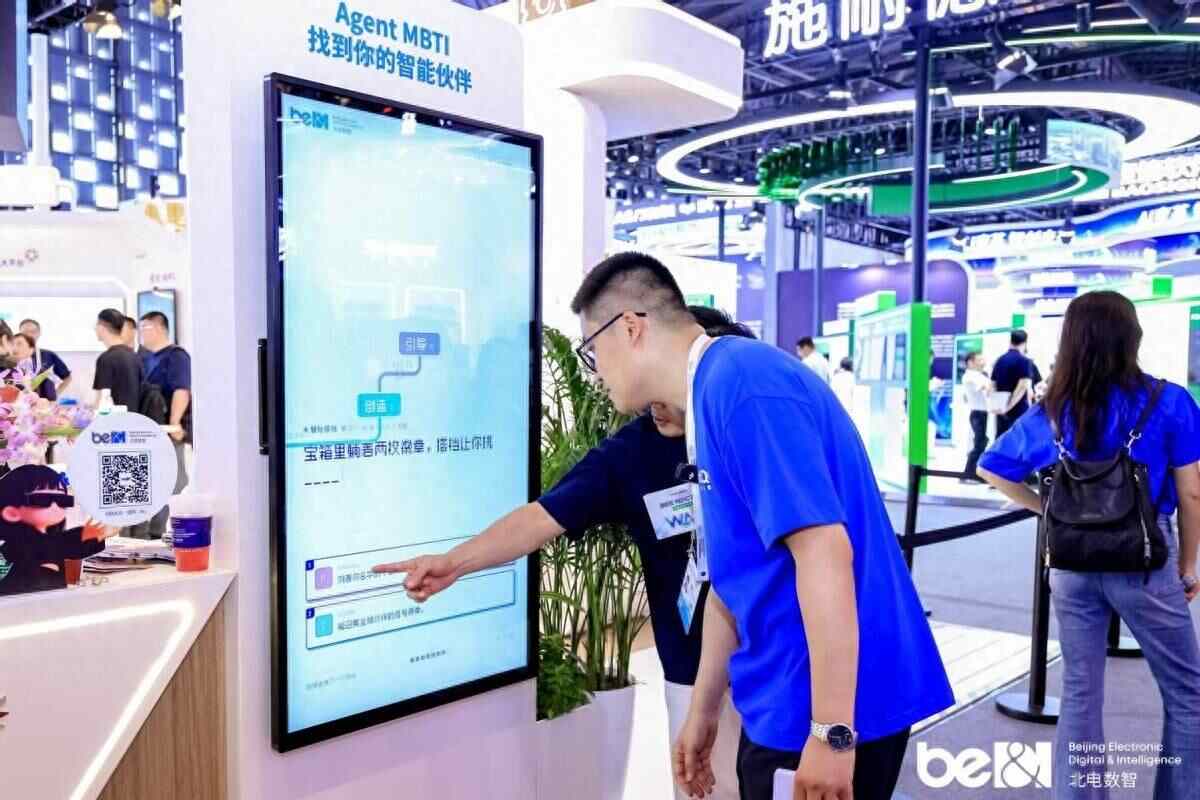
WAIC 2026 | 如果Agent有性格,你的智能夥伴會是什麼樣的?
北電數智在WAIC 2026現場展示AI賦能民生的實際應用,包括家醫助手、教育數字大腦、長纓AIGC平台等,讓觀眾體驗AI如何服務城市中的每個人。展區中的Agent MBTI測試吸引排隊人潮,透過趣味互動傳遞「有溫度的AI」理念,強調科技應以人為本、貼近民生。

全體起立:面向AI智能體的Internet Court現已開庭
隨著人工智慧技術快速發展,AI 智能體(AI Agent)正逐漸成為人人可用的工具。這些智能體在雲端運行,隨時待命於手機裝置中,協助使用者處理回覆郵件、預訂航班、甚至執行投資組合的稅損收割等事務。目前,Robinhood 用戶已能利用 AI 智能體分析股市劇烈震盪,並根據自訂指令自動完成交易;思愛普(SAP)的智能助手 Joule 可協助企業客戶分析庫存、篩選供應商、完成採購;亞馬遜的購物智能體 Buy for Me 則能全網搜尋最優惠商品、與賣方智能體協商條款、確定配送時段並下單。
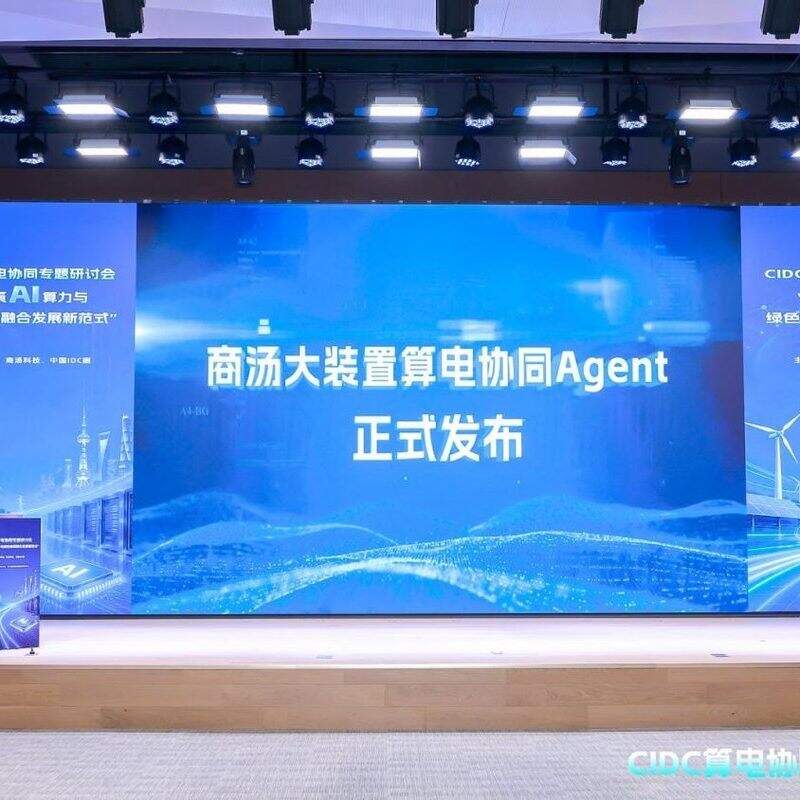
WAIC 2026商湯大裝置發佈算電協同Agent,單位電力成本Token產出提升80%
商湯大裝置在WAIC 2026發布算電協同Agent,率先提出TPW(Tokens Per Watt)指標,並已在臨港AIDC落地,實現單位電力成本Token產出提升80%。該產品通過中國信通院權威測試,並與多家夥伴發起算電協同生態聯合體,推動智算中心從傳統能源管理邁向系統級算效優化。