Crawlee for Python:打造具備機器人處理、連結圖譜與RAG分塊匯出的網頁爬取管道
重點摘要
在本教學中,我們建置了一套完整的 Crawlee for Python 工作流程,涵蓋環境設定、本機網站生成、靜態爬取、動態爬取、結構化擷取及下游資料處理。首先,我們配置相容的 Crawlee 執行環境,包含固定版本的 Pydantic 支援、Playwright 瀏覽器安裝、持久化儲存目錄,以及 Colab 安全執行處理。接著,我們產生一個擬真的本機示範網站,包含產品頁面、文件頁面、部落格內容、內部連結、robots.txt 規則、JSON-LD 元資料,以及 JavaScript 渲染的商品目錄。透過 BeautifulSoupCrawler,我們執行快速的遞迴 HTML 爬取,並擷取頁面標題、元資料、文字預覽、對外連結、產品屬性、文件標題、程式碼區塊與部落格標籤。
In this tutorial, we build a full Crawlee-for-Python workflow that covers environment setup, local website generation, static crawling, dynamic crawling, structured extraction, and downstream data processing. We begin by configuring a compatible Crawlee runtime with pinned Pydantic support, Playwright browser installation, persistent storage directories, and Colab-safe execution handling. We then generate a realistic local demo website containing product pages, documentation pages, blog content, internal links, robots.txt rules, JSON-LD metadata, and JavaScript-rendered catalog items. Using BeautifulSoupCrawler, we perform fast recursive HTML crawling and extract page titles, metadata, text previews, outgoing links, product attributes, documentation headings, code blocks, and blog tags. With ParselCrawler, we run precise CSS- and XPath-based extraction on product detail pages. With PlaywrightCrawler, we render JavaScript content in a headless Chromium browser, wait for dynamic DOM elements to appear, extract client-side data, and capture full-page screenshots. Setting Up the Crawlee Python Runtime and Helpers Copy CodeCopiedUse a different Browserimport os import sys import re import csv import json import time import math import shutil import socket import hashlib import asyncio import textwrap import subprocess import threading from pathlib import Path from functools import partial from http.server import ThreadingHTTPServer, SimpleHTTPRequestHandler from importlib.metadata import version, PackageNotFoundError SETUP_SENTINEL = "/content/.crawlee_python_tutorial_setup_done_v2" def sh(command, check=True, quiet=False): print(f"\n$ {command}") result = subprocess.run( command, shell=True, text=True, stdout=subprocess.PIPE, stderr=subprocess.STDOUT, ) if not quiet and result.stdout: print(result.stdout[-5000:]) if check and result.returncode != 0: raise RuntimeError(f"Command failed with exit code {result.returncode}: {command}") return result.returncode == 0 def package_version(package_name): try: return version(package_name) except PackageNotFoundError: return None def is_good_pydantic_version(v): if not v: return False m = re.match(r"^(\d+)\.(\d+)", v) if not m: return False major, minor = int(m.group(1)), int(m.group(2)) return major == 2 and minor == 11 current_crawlee = package_version("crawlee") current_pydantic = package_version("pydantic") needs_setup = ( not os.path.exists(SETUP_SENTINEL) or current_crawlee is None or not is_good_pydantic_version(current_pydantic) ) if needs_setup: print("PHASE 1: Installing compatible Crawlee + Pydantic + Playwright dependencies.") print("After this finishes, Colab will restart automatically. Then run this same cell again.") sh(f'{sys.executable} -m pip uninstall -y crawlee pydantic pydantic-core', check=False) sh( f'{sys.executable} -m pip install -q -U ' f'"pydantic>=2.11,<2.12" ' f'"crawlee[all]" ' f'pandas matplotlib networkx nest_asyncio beautifulsoup4 parsel' ) sh(f'{sys.executable} -m playwright install --with-deps chromium', check=False) Path(SETUP_SENTINEL).write_text("done", encoding="utf-8") print("\nInstalled versions:") sh(f'{sys.executable} -m pip show crawlee pydantic pydantic-core', check=False) try: import google.colab print("\nRestarting Colab runtime now. After it reconnects, run this same cell again.") os.kill(os.getpid(), 9) except Exception: raise SystemExit("Setup complete. Restart the runtime/kernel manually, then run this cell again.") print("PHASE 2: Dependencies are ready. Running the Crawlee tutorial.") import pandas as pd import matplotlib.pyplot as plt import networkx as nx import nest_asyncio nest_asyncio.apply() TUTORIAL_ROOT = Path("/content/crawlee_python_advanced_tutorial") SITE_DIR = TUTORIAL_ROOT / "demo_site" OUTPUT_DIR = TUTORIAL_ROOT / "outputs" STORAGE_DIR = TUTORIAL_ROOT / "crawlee_storage" SCREENSHOT_DIR = OUTPUT_DIR / "screenshots" for path in [SITE_DIR, OUTPUT_DIR, STORAGE_DIR]: if path.exists(): shutil.rmtree(path) for path in [SITE_DIR, OUTPUT_DIR, STORAGE_DIR, SCREENSHOT_DIR]: path.mkdir(parents=True, exist_ok=True) os.environ["CRAWLEE_STORAGE_DIR"] = str(STORAGE_DIR) os.environ["CRAWLEE_LOG_LEVEL"] = "INFO" os.environ["CRAWLEE_PURGE_ON_START"] = "true" from crawlee import Glob, ConcurrencySettings from crawlee.crawlers import ( BeautifulSoupCrawler, BeautifulSoupCrawlingContext, ParselCrawler, ParselCrawlingContext, PlaywrightCrawler, PlaywrightCrawlingContext, ) try: import crawlee print("Crawlee version:", crawlee.__version__) except Exception: print("Crawlee imported successfully.") print("Pydantic version:", package_version("pydantic")) def safe_slug(value): value = re.sub(r"[^a-zA-Z0-9]+", "-", str(value)).strip("-").lower() return value or "item" def money_to_float(value): if value is None: return None cleaned = re.sub(r"[^0-9.]", "", str(value)) return float(cleaned) if cleaned else None def normalize_text(value, max_len=None): value = re.sub(r"\s+", " ", value or "").strip() return value[:max_len] if max_len else value def write_file(path, content): path = Path(path) path.parent.mkdir(parents=True, exist_ok=True) path.write_text(textwrap.dedent(content).strip() + "\n", encoding="utf-8") We begin by preparing the complete Colab runtime for the Crawlee tutorial. We install compatible versions of Crawlee, Pydantic, Playwright, and the required analysis libraries, and handle the automatic restart required after setup. We then configure storage folders, environment variables, crawler imports, and helper functions to ensure the rest of the workflow runs smoothly. Generating the Demo Website and Product Catalog Copy CodeCopiedUse a different BrowserPRODUCTS = [ { "sku": "CRW-101", "name": "Crawler Reliability Kit", "category": "automation", "price": 149.0, "rating": 4.8, "stock": 18, "features": ["retry policy", "queue replay", "structured logs"], "related": ["CRW-202", "CRW-303"], }, { "sku": "CRW-202", "name": "Playwright Rendering Pack", "category": "browser", "price": 249.0, "rating": 4.7, "stock": 9, "features": ["headless chromium", "screenshots", "dynamic DOM extraction"], "related": ["CRW-101", "CRW-404"], }, { "sku": "CRW-303", "name": "RAG Extraction Bundle", "category": "ai-data", "price": 199.0, "rating": 4.9, "stock": 13, "features": ["clean text chunks", "metadata capture", "JSONL export"], "related": ["CRW-101", "CRW-505"], }, { "sku": "CRW-404", "name": "Anti-Fragile Session Toolkit", "category": "resilience", "price": 299.0, "rating": 4.6, "stock": 5, "features": ["session rotation", "state recovery", "graceful failures"], "related": ["CRW-202", "CRW-505"], }, { "sku": "CRW-505", "name": "Data Export Control Plane", "category": "storage", "price": 179.0, "rating": 4.5, "stock": 21, "features": ["datasets", "key-value store", "CSV and JSON export"], "related": ["CRW-303", "CRW-404"], }, ] def layout(title, body, extra_head="", extra_script=""): css = """ <style> body { font-family: Inter, system-ui, -apple-system, BlinkMacSystemFont, "Segoe UI", sans-serif; margin: 0; background: #f7f7fb; color: #1f2430; } header { background: #202638; color: white; padding: 28px 40px; } nav a { color: #dbe7ff; margin-right: 18px; text-decoration: none; font-weight: 600; } main { max-width: 1050px; margin: 0 auto; padding: 32px; } .grid { display: grid; grid-template-columns: repeat(auto-fit, minmax(230px, 1fr)); gap: 18px; } .card, article, .panel { background: white; border: 1px solid #e5e7ef; border-radius: 16px; padding: 20px; box-shadow: 0 8px 25px rgba(20, 30, 60, 0.05); } .price { font-size: 1.3rem; font-weight: 800; } .tag { display: inline-block; background: #edf2ff; border: 1px solid #d6e0ff; border-radius: 999px; padding: 4px 10px; margin: 3px; font-size: 0.82rem; } .stock-low { color: #b42318; font-weight: 700; } .stock-ok { color: #067647; font-weight: 700; } code, pre { background: #111827; color: #d1fae5; border-radius: 10px; } pre { padding: 16px; overflow-x: auto; } footer { padding: 30px 40px; color: #606779; } </style> """ return f""" <!do
Related
相關文章
Nous Research Updates Hermes Agent With a Blank Slate Mode That Pins Toolsets via platform_toolsets.cli and disabled_toolsets
Nous Research has added a Blank Slate setup mode to its open-source Hermes Agent. It inverts the usual onboarding. Instead of a fully loaded default, you start with almost nothing. Hermes Agent is the self-improving agent framework from Nous Research. It runs on your own machine. The team announced the new mode on X. Blank Slate now joins two existing options: Quick Setup and Full Setup. TL;DR Blank Slate boots an agent with everything off except provider & model, File Operations, and Terminal. Web, browser, code execution, vision, memory, delegation, cron, skills, plugins, and MCP stay disabled. It writes an explicit platform_toolsets.cli list plus agent.disabled_toolsets to pin the surface. Nothing you skipped loads later — not even after hermes update. Re-enable anything with hermes too
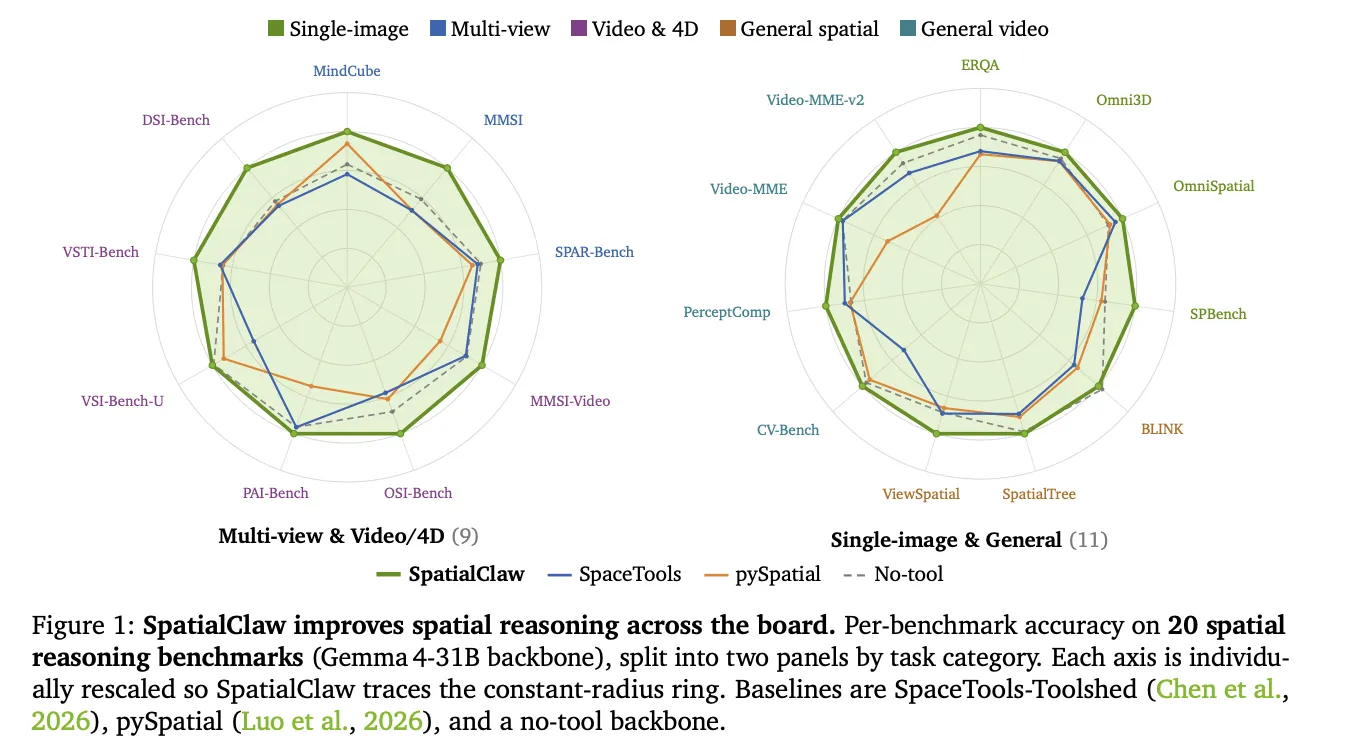
NVIDIA AI 推出 SpatialClaw:無需訓練的代理程式,將程式碼視為空間推理的動作介面
NVIDIA Research 發布了 SpatialClaw,這是一個無需訓練的空間推理框架。該框架針對視覺語言模型(VLM)持續存在的弱點——難以判斷物體的位置、相對關係及在三維空間中的移動方式。SpatialClaw 不重新訓練模型,而是改變代理程式用來呼叫感知工具的動作介面。研究團隊指出,介面才是瓶頸所在。他們的解決方案是將程式碼作為動作介面。在 20 項基準測試中,SpatialClaw 達到平均 59.9% 的準確率,比近期發布的空間代理 SpaceTools 高出 11.2 個百分點。
網易有道全面向AI轉型 全場景Agent矩陣亮相圖博會
{"id":"39ef5947-b77a-4904-bf03-ff6264f08dc4","object":"response","model":"deepseek-v4-flash","output":[],"stop_reason":"max_output_tokens","usage":{"input_tokens":154,"output_tokens":200,"total_tokens":354}}
MosaicLeaks: Can your research agent keep a secret?
Back to Articles MosaicLeaks: Can your research agent keep a secret? Enterprise Article Published June 18, 2026 Upvote - Alexander Gurung agurung Follow ServiceNow Rafael Pardinas rafapi-snow Follow ServiceNow TL;DR Deep research agents increasingly combine private local documents with external tools like web retrieval, creating a privacy risk: an agent's external queries may leak sensitive information. MosaicLeaks proposes a new deep-research task with multi-hop questions that interleave public and private information. Across the models we tested, agents frequently leaked private information, and training only for task performance made it worse. We propose a mosaic-leakage-aware RL training method, Privacy-Aware Deep Research (PA-DR), which raises strict chain success (the share of chains

騰訊老兵+大廠00後新銳,碼上飛想做的不只是AI Coding
這篇消息聚焦「騰訊老兵+大廠00後新銳,碼上飛想做的不只是AI Coding」。原始導語提到:已接入華為鴻蒙生態 從 AI 情報角度來看,這類內容值得關注其背後的技術進展、產品落地、產業競爭與後續市場影響。

Agent引爆網盤大戰,騰訊、百度、阿里齊聚,這次爭的不再是下載速度
這篇消息聚焦「Agent引爆網盤大戰,騰訊、百度、阿里齊聚,這次爭的不再是下載速度」。原始導語提到:網盤成了Agent新基建。 從 AI 情報角度來看,這類內容值得關注其背後的技術進展、產品落地、產業競爭與後續市場影響。