認識 EAGLE 3.1:修復大型語言模型推理中注意力漂移的推測解碼演算法
重點摘要
推測解碼是一種加速大型語言模型推理的技術。小型快速的草稿模型會先提出數個 token,再由大型目標模型平行驗證。若驗證通過,推理速度便會提升;若遭拒絕,系統也能優雅降級。由 EAGLE 團隊、vLLM 團隊與 TorchSpec 團隊共同推出的 EAGLE 系列(包含 EAGLE 1、EAGLE 2 及 EAGLE 3),已成為研究與生產環境中最廣泛採用且實際部署的推測解碼演算法家族之一。今日,該家族迎來針對可靠性的升級——EAGLE 3.1 正式問世。過去的問題在於:推測解碼在受控環境中表現良好,但面對不同的對話模板、長上下文輸入或分佈外的情境時,效能往往會顯著下降。
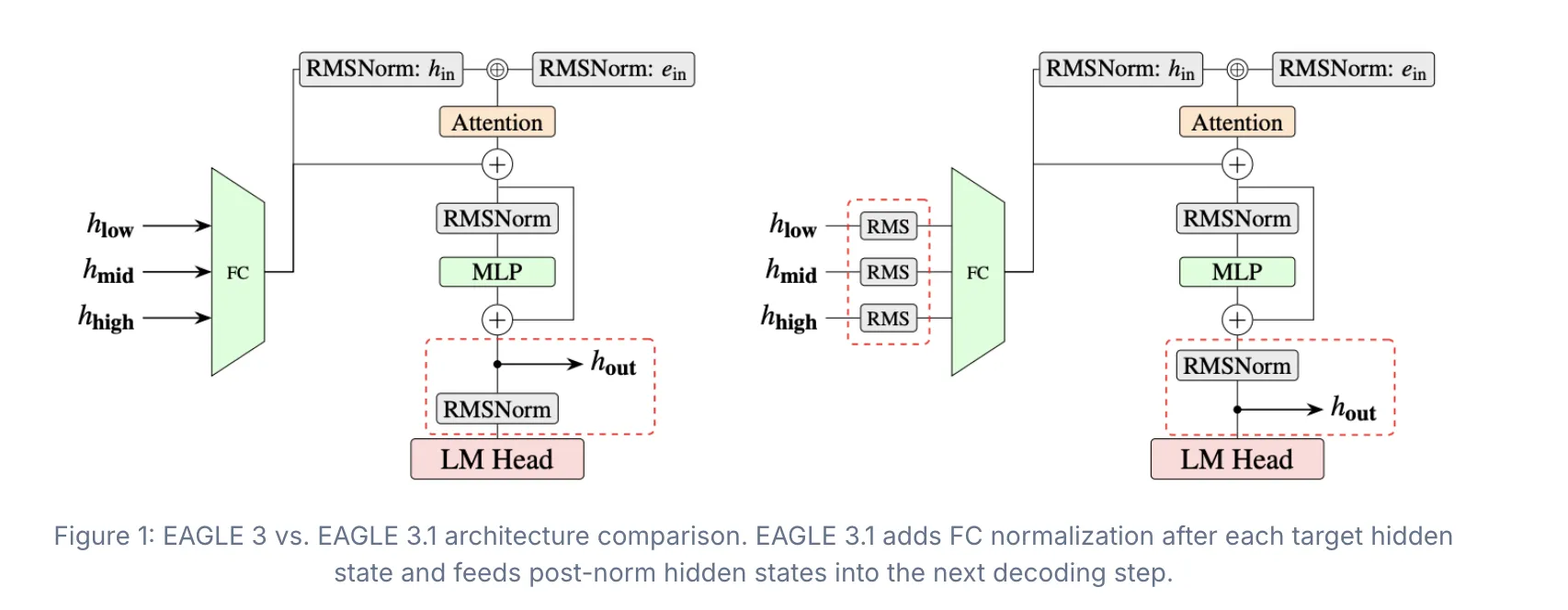
Speculative decoding is a technique for speeding up large language model inference. A small, fast draft model proposes several tokens. The large target model verifies them in parallel. If accepted, inference is faster. If rejected, the system falls back gracefully. EAGLE Team, vLLM Team, and TorchSpec Team has launched the EAGLE series including EAGLE 1, EAGLE 2, and EAGLE 3 has become one of the most widely adopted and practically deployed families of speculative decoding algorithms across both research and production systems. Today, that family gets a targeted reliability upgrade with introduction of EAGLE 3.1. What was Going Wrong While speculative decoding performs well in controlled settings, performance often degrades under different chat templates, long-context inputs, or out-of-distribution system prompts. The EAGLE team traced this fragility to a phenomenon called attention drift as speculation depth increases, the drafter gradually shifts attention away from sink tokens and toward its own generated tokens. In simpler terms: the drafter is a small model that predicts future tokens. As speculation gets deeper, it starts attending to its own prior outputs instead of the original context. This degrades acceptance length and output stability. Two underlying issues were identified. First, the fused input representation becomes increasingly imbalanced as higher-layer hidden states dominate the drafter input. Second, hidden-state magnitude grows across speculation steps due to the unnormalized residual path. Together, these effects make the drafter progressively less stable at deeper speculation depths. Two Architectural Fixes in EAGLE 3.1 To address attention drift, EAGLE 3.1 comes with two key architectural improvements: FC normalization after each target hidden state and before the FC layer, and feeding post-norm hidden states into the next decoding step. FC normalization stabilizes the hidden states that the drafter receives from the target model. Without it, hidden-state magnitude grows across steps, making the drafter increasingly unreliable. Applying normalization at each step keeps the inputs bounded. The post-norm design makes the method behave more like recursively invoking the drafter across decoding steps, rather than simply appending additional layers to the target model. https://vllm.ai/blog/2026-05-26-eagle-3-1 What These Fixes Deliver Compared with EAGLE 3, EAGLE 3.1 demonstrates: better training-time to inference-time extrapolation, stronger long-context robustness, higher resilience to chat template and system prompt variation, and more stable acceptance length across diverse serving environments. In long-context workloads, EAGLE 3.1 achieves up to 2× longer acceptance length compared with EAGLE 3. Training Infrastructure: TorchSpec TorchSpec now provides efficient training support for EAGLE 3.1 and future speculative decoding algorithms. By lowering training overhead and simplifying experimentation workflows, TorchSpec helps accelerate iteration and exploration for next-generation speculative decoding research and deployment. Based on TorchSpec and vLLM, the research team also trained and open-sourced an EAGLE 3.1 draft model for Kimi K2.6, available on HuggingFace. The model serves as an example of deploying EAGLE 3.1 with TorchSpec training and vLLM serving support on a real-world serving model vLLM Integration: Config-Driven and Backward-Compatible EAGLE 3.1 lands in vLLM as a config-driven extension of the existing EAGLE 3 implementation. The integration includes FC normalization support, post-norm hidden-state feedback, and removal of hardcoded assumptions around target hidden states. Backward compatibility with existing EAGLE 3 checkpoints is fully preserved. EAGLE 3.1 draft models can be plugged directly through the same speculative-decoding code path. Copy CodeCopiedUse a different Browservllm serve nvidia/Kimi-K2.6-NVFP4 \ --trust-remote-code \ --tensor-parallel-size 4 \ --tool-call-parser kimi_k2 \ --enable-auto-tool-choice \ --reasoning-parser kimi_k2 \ --attention-backend tokenspeed_mla \ --speculative-config '{"model":"lightseekorg/kimi-k2.6-eagle3.1-mla","method":"eagle3","num_speculative_tokens":3}' \ --language-model-only Benchmark Results on Kimi K2.6 The research team benchmarked the Kimi K2.6 EAGLE 3.1 draft model on Kimi-K2.6-NVFP4 with vLLM (TP=4, GB200, non-disagg) on the SPEED-Bench coding dataset. EAGLE 3.1 delivers 2.03× higher per-user output throughput at concurrency 1. The speedup stays meaningful as concurrency scales: 1.71× at C=4 and 1.66× at C=16. Marktechpost’s Visual Explainer #mtp-eagle31,#mtp-eagle31 *{box-sizing:border-box!important;margin:0!important;padding:0!important;font-family:'Courier New',Courier,monospace!important} #mtp-eagle31{width:100%!important;max-width:780px!important;margin:0 auto!important;background:#0c0c0c!important;border:1px solid #444!important;position:relative!important;overflow:hidden!important;display:block!important} #mtp-eagle31 .mtp-track{display:flex!important;flex-wrap:nowrap!important;transition:transform .45s cubic-bezier(.77,0,.18,1)!important} #mtp-eagle31 .mtp-slide{width:100%!important;flex-shrink:0!important;flex-grow:0!important;padding:44px 52px 36px!important;background:#0c0c0c!important;position:relative!important;overflow:hidden!important} #mtp-eagle31 .mtp-inner{min-height:280px!important;display:flex!important;flex-direction:column!important;justify-content:center!important} #mtp-eagle31 .mtp-tag{display:inline-block!important;font-size:10px!important;letter-spacing:.18em!important;text-transform:uppercase!important;color:#aaa!important;border:1px solid #444!important;padding:4px 10px!important;margin-bottom:18px!important;border-radius:2px!important;width:auto!important} #mtp-eagle31 .mtp-h1{font-size:28px!important;font-weight:700!important;color:#ffffff!important;line-height:1.25!important;margin-bottom:14px!important;letter-spacing:-.02em!important} #mtp-eagle31 .mtp-h2{font-size:20px!important;font-weight:700!important;color:#ffffff!important;line-height:1.3!important;margin-bottom:18px!important;letter-spacing:-.01em!important} #mtp-eagle31 .mtp-divider{width:28px!important;height:1px!important;background:#444!important;margin-bottom:20px!important;display:block!important} #mtp-eagle31 .mtp-sub{font-size:14px!important;color:#d0d0d0!important;line-height:1.75!important;margin-bottom:10px!important;display:block!important} #mtp-eagle31 .mtp-list{list-style:none!important;margin-top:10px!important;display:block!important;width:100%!important} #mtp-eagle31 .mtp-list li{font-size:14px!important;color:#d0d0d0!important;line-height:1.7!important;padding:9px 0 9px 22px!important;border-bottom:1px solid #222!important;position:relative!important;display:block!important;width:100%!important} #mtp-eagle31 .mtp-list li:last-child{border-bottom:none!important} #mtp-eagle31 .mtp-list li::before{content:'\2192'!important;position:absolute!important;left:0!important;top:9px!important;color:#aaa!important;font-size:13px!important} #mtp-eagle31 .mtp-hi{color:#ffffff!important;font-weight:700!important} #mtp-eagle31 .mtp-metric{display:grid!important;grid-template-columns:repeat(3,1fr)!important;gap:10px!important;margin-top:8px!important;width:100%!important} #mtp-eagle31 .mtp-card{background:#181818!important;border:1px solid #444!important;padding:18px 10px!important;border-radius:4px!important;text-align:center!important;display:block!important} #mtp-eagle31 .mtp-num{font-size:26px!important;font-weight:700!important;color:#ffffff!important;display:block!important;letter-spacing:-.03em!important;margin-bottom:6px!important} #mtp-eagle31 .mtp-label{font-size:11px!important;color:#aaa!important;text-transform:uppercase!important;letter-spacing:.1em!important;display:block!important;line-height:1.4!important} #mtp-eagle31 .mtp-code{background:#141414!important;border:1px solid #444!important;border-radius:4px!important;padding:16px 18px!important;margin-top
Related
相關文章

Edge AI Daily 早報(6月19日)
AI Engineer World's Fair 2026規模再創新高,標誌AI工程從幕後走向舞臺中央。行業面臨結構性調整:楊立昆警示OpenAI年虧210億美元揭示商業模式脆弱性,Transformer之父轉投OpenAI反映人才爭奪白熱化。Anthropic多線佈局——語音支持七種語言、加入碳清除聯盟、落子首爾辦事處,展現生態擴張野心。監管壓力加劇,意大利依據DMA調查蘋果iCloud,巴西開放iOS側載佣金降至5%,蘋果圍牆花園持續崩塌。

今天起,Claude Design要把設計師和程序員變成同一種人了
猝不及防!Anthropic深夜甩出Claude Design大更新,設計系統一鍵導入,代碼雙向同步,9大平臺一鍵導出。Anthropic設計師親自下場錄屏:AI跑了八輪自查,才敢把設計稿給你看。
OpenAI 成為 Rust 基金會白金會員,合計贊助 60 萬美元
OpenAI 正式成為 Rust 基金會白金會員,將提供總計 60 萬美元資金,用於支持 Rust 開源項目維護者及 Rust 創新實驗室等計劃。這標誌著 AI 巨頭對安全、高效系統編程語言的重視。 #OpenAI #Rust #開源

Claude Design 上線首周用戶破百萬,和 Claude Code 共享 AI 配額
Anthropic 今天(6 月 18 日)發佈公告,在宣佈 Claude Design 上線首周用戶規模突破 100 萬後,進一步強化和 Claude Code 的雙向聯動,實現從設計到編程的無縫工作流。
谷歌時隔6年再發智能音箱,Gemini上桌,售價不到700元
智東西 編譯 | 劉煜 編輯 | 陳駿達 智東西6月18日消息,谷歌昨日宣佈,其首款搭載居家版Gemini語音助手的智能音箱(Google Home Speaker)已開啟預售,將於當地時間6月25日正式上市,售價為99.99美元(約合人民幣677.03元)。在此之前,谷歌已有6年沒有推出過獨立智能音箱產品。 谷歌這款智能音箱外觀近似球形,風格類似亞馬遜新一代Echo音箱與蘋果舊款音箱HomePod Mini。 ▲谷歌智能音箱(圖源:谷歌官網) 使用音箱時,用戶只需通過口令“Hey Google”或“OK Google”喚醒Gemini,就可以繼續下達相應指令。這與谷歌舊款音箱、智能顯示屏等喚醒語音助手的方式相同。此外,用戶只要按照日常說話習慣下達命令,Gemini便能理解用戶意圖,相比之前大大提升溝通效率。 一、加強短時對話記憶,會員可與Gemini不限次數對話 谷歌此次推出的全新音箱升級諸多功能。其中,音箱搭載的Gemini語音助手擁有10款全新擬人化語音音色,用戶可以根據喜好自行選擇聲線。音箱還可支持用戶一次性下達多條語音指令,即使指令未能說對、說完整,用戶中途改口Gemini也能識別。 Gemini還具備多鏈路推理能力,落地到實際生活場景中比較實用。例如,用戶問:“我支持的足球隊下場比賽天氣如何?”Gemini收到指令後,會自動查詢賽事時間、舉辦地點,同時匹配相應時段天氣,再給出答覆。 同時,Gemini加強了短時對話記憶,能承接上下文實現連續對話功能。即使用戶連續追問、甚至串聯多項任務、不重複交代前置條件,該語音助手也能實現來回連貫交流。 ▲谷歌Gemini對話場景(圖源:谷歌官網) 不僅如此,Gemini搭配的連續對話功能,能讓應答後的音箱麥克風保持短暫收音,用戶無需重複喊“OK Google”就能繼續提問。該功能現已全面支持所有Gemini原生適配的語言,包括

微軟,考慮接入DeepSeek
這篇消息聚焦「微軟,考慮接入DeepSeek」。原始導語提到:Copilot Cowork轉為按量計費。 從 AI 情報角度來看,這類內容值得關注其背後的技術進展、產品落地、產業競爭與後續市場影響。