Hermes Agent 推出 MCP 工具搜尋功能:Anthropic 評測顯示 Opus 4 準確率提升 49% 至 74%
重點摘要
Nous Research 的開源 Hermes Agent 現已內建「工具搜尋」(Tool Search)功能。該功能直接解決了 AI 代理系統日益嚴重的瓶頸:過多的 MCP 工具塞滿上下文視窗。本文將詳細解說 Tool Search 的作用、運作方式,以及何時該使用它。 問題:MCP 工具正在吃掉你的上下文視窗 當你將多個 MCP(模型上下文協定)伺服器連接到 AI 代理時,每次呼叫都會把每個工具的 JSON 架構傳給模型——即使模型只會用到一兩個工具。實際部署時馬上就會感受到這個問題。一個搭載五個 MCP 伺服器、共 34 個工具的 Hermes 部署實例,每次對話平均提示大小為 45,000 個 token,其中約 22,000 個 token(約佔 50%)純粹是工具架構的開銷。
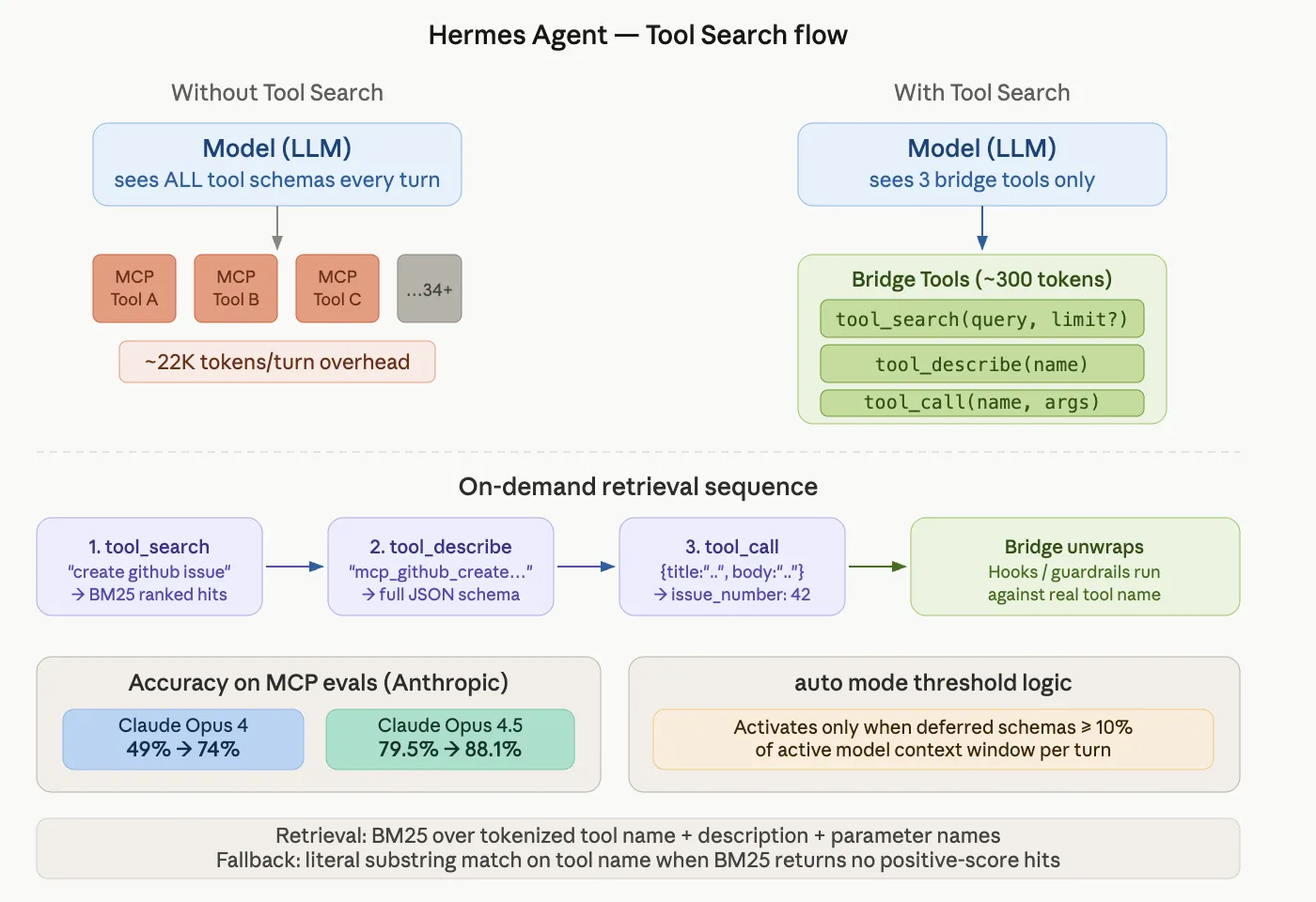
Nous Research’s open-source Hermes Agent now ships a Tool Search feature. It directly addresses a growing bottleneck in AI agent systems: too many MCP tools filling up the context window. In this explainer article, we will breaks down what Tool Search does, how it works, and when to use it. The Problem: MCP Tools Are Eating Your Context Window When you connect multiple MCP (Model Context Protocol) servers to an AI agent, every tool’s JSON schema gets sent to the model on every turn. This happens even if the model only needs one or two tools for a given task. Real-world deployments feel this immediately. A Hermes deployment with five MCP servers and 34 tools shows average prompt sizes of 45,000 tokens per turn. Roughly 22,000 of those tokens — around 50% — are tool schema overhead alone. Anthropic’s own engineering data shows tool definitions can consume 134,000 tokens before optimization. Tool Attention measures the “MCP Tools Tax” at 15,000–60,000 tokens per turn for typical multi-server deployments. This creates two distinct problems: Cost: Cache-miss generations at session start can cost $0.07–$0.10 per turn. Accuracy loss: Decision paralysis sets in when the model sees hundreds of irrelevant tool options simultaneously. Source: hermes-agent.nousresearch.com/docs · Nous Research 2026 What is Tool Search? Tool Search is Hermes Agent’s opt-in progressive-disclosure layer for MCP and non-core plugin tools. Instead of loading every tool schema upfront, the model loads only what it needs — on demand, per turn. When Tool Search activates, MCP and plugin tools are replaced in the model-visible tools array by three bridge tools: Copy CodeCopiedUse a different Browsertool_search(query, limit?) — search the deferred-tool catalog tool_describe(name) — load the full schema for one tool tool_call(name, arguments) — invoke a deferred tool A typical interaction looks like this: Copy CodeCopiedUse a different BrowserModel: tool_search("create a github issue") → { matches: [{ name: "mcp_github_create_issue", ... }] } Model: tool_describe("mcp_github_create_issue") → { parameters: { type: "object", properties: { ... } } } Model: tool_call("mcp_github_create_issue", { title: "...", body: "..." }) → { ok: true, issue_number: 42 } The model searches for what it needs, loads the schema, then calls the tool. All hooks, guardrails, and approval prompts run against the real underlying tool name — not against the bridge. The Accuracy Numbers This is not just a token-saving feature. Tool Search also improves model accuracy on MCP evaluations. According to Anthropic’s internal MCP evals: Claude Opus 4: accuracy improved from 49% → 74% with Tool Search enabled Claude Opus 4.5: accuracy improved from 79.5% → 88.1% with Tool Search enabled Large tool catalogs create “decision paralysis” — the model gets confused choosing among many irrelevant options. Removing those options from the context window reduces false positives. Anthropic’s data also shows an 85% reduction in tool-definition token usage while maintaining access to the full tool library. How the Retrieval Works: BM25 + Fallback Under the hood, Hermes uses BM25 — a classic information retrieval algorithm — to match the model’s query against a catalog of tool names, descriptions, and parameter names. If BM25 returns no positive-score hits, the system falls back to a literal substring match on the tool name. This protects against zero-IDF degenerate cases, such as searching for "github" in a catalog where every tool name contains “github.” The catalog is stateless across turns. It rebuilds from the current tool-defs list on every assembly. This prevents drift bugs where a stored catalog goes out of sync with the live tool registry. When Does Tool Search Activate? By default, Tool Search runs in auto mode. It activates only when the deferrable tool schemas would consume at least 10% of the active model’s context window. Below that threshold, the tools-array assembly is a pure pass-through. You pay no overhead. This decision is re-evaluated on every turn: A session with just a few MCP tools and a long-context model may never activate Tool Search. A session with many MCP servers attached (15+ tools typically) starts activating it. Removing servers mid-session correctly returns to direct tool exposure on the next assembly. Configuration Reference Add this to your hermes.yaml to control the behavior: Copy CodeCopiedUse a different Browsertools: tool_search: enabled: auto # auto (default), on, or off threshold_pct: 10 # % of context at which auto mode kicks in search_default_limit: 5 max_search_limit: 20 KeyDefaultMeaningenabledautoauto activates above threshold; on always activates if there’s at least one deferrable tool; off disables entirelythreshold_pct10Percentage of context length at which auto kicks in. Range: 0–100search_default_limit5Hits returned when the model calls tool_search without a limitmax_search_limit20Hard upper bound the model can request via limit. Range: 1–50 You can also use a simple boolean shorthand: Copy CodeCopiedUse a different Browsertools: tool_search: true # equivalent to {enabled: auto} Marktechpost’s Visual Explainer #hts-wrap{font-family:'Georgia',serif!important;background:#f7f5f0!important;border:1px solid #e0dbd0!important;border-radius:12px!important;max-width:780px!important;margin:0 auto!important;position:relative!important} #hts-wrap p:empty,#hts-wrap del,#hts-wrap s{display:none!important} #hts-viewport{border-radius:12px 12px 0 0!important;overflow:hidden!important;position:relative!important} #hts-slides{display:flex!important;transition:transform .42s cubic-bezier(.77,0,.175,1)!important;will-change:transform!important;align-items:flex-start!important} .hts-slide{min-width:100%!important;padding:48px 56px 44px!important;background:#f7f5f0!important;position:relative!important;box-sizing:border-box!important} .hts-accent{position:absolute!important;top:0!important;left:0!important;right:0!important;height:3px!important;background:#1a1610!important} .hts-tag{display:inline-block!important;font-family:'Georgia',serif!important;font-size:10px!important;font-weight:400!important;letter-spacing:.12em!important;text-transform:uppercase!important;color:#7a6a52!important;background:#ede8df!important;border:1px solid #d8d0c0!important;border-radius:4px!important;padding:4px 10px!important;margin:16px 0 14px!important} .hts-num{font-family:'Georgia',serif!important;font-size:11px!important;color:#b0a890!important;letter-spacing:.08em!important;margin:0 0 10px!important;display:block!important} .hts-title{font-family:'Georgia',serif!important;font-size:22px!important;font-weight:700!important;color:#1a1610!important;line-height:1.28!important;margin:0 0 16px!important;letter-spacing:-.01em!important} .hts-body{font-family:'Georgia',serif!important;font-size:15px!important;color:#3d3626!important;line-height:1.72!important;margin:0 0 18px!important} .hts-body strong{font-weight:700!important;color:#1a1610!important} .hts-code{display:block!important;background:#1a1610!important;color:#d4c9a8!important;font-family:'Courier New',monospace!important;font-size:12px!important;line-height:1.75!important;padding:18px 22px!important;border-radius:8px!important;margin:0 0 18px!important;overflow-x:auto!important;white-space:pre!important} .hts-stat-row{display:flex!important;gap:12px!important;margin:0 0 10px!important;flex-wrap:wrap!important} .hts-stat{flex:1!important;min-width:140px!important;background:#fff!important;border:1px solid #e0dbd0!important;border-radius:8px!important;padding:16px 14px!important;text-align:center!important;box-sizing:border-box!important} .hts-stat-val{font-family:'Georgia',serif!important;font-size:20px!important;font-weight:700!important;color:#1a1610!important;display:block!important;margin:0 0 5px!important} .hts-stat-label{font-family:'Georgia',serif!important;font-size:11px!important;color:#7a6a52!important;letter-spacing:.03em!important;line-height:1.5!important
Related
相關文章
Liquid AI Introduces LFM2.5-Embedding-350M and LFM2.5-ColBERT-350M: Dense Bi-Encoder and Late-Interaction Models for Fast Multilingual Search Across 11 Languages
This week, Liquid AI released two new retrieval models. They are LFM2.5-ColBERT-350M and LFM2.5-Embedding-350M. Both hold 350M parameters. Both are the first bidirectional members of the LFM family. They build on LFM2.5-350M-Base, released in March. The pair targets fast multilingual and cross-lingual search across 11 languages. Their footprint is small enough to run almost anywhere. Both are available now on Hugging Face under the LFM Open License v1.0. LFM2.5 Retrievers The two models share one backbone but represent text differently. LFM2.5-Embedding-350M is a dense bi-encoder. It turns each document into a single vector. Pick it when you want the fastest search and the smallest, cheapest index. LFM2.5-ColBERT-350M is a late-interaction model. It converts each token into a vector rather
Perplexity Launches Brain, a Self-Improving Memory System That Builds a Context Graph of an Agent’s Work and Learns Overnight
Most AI memory remembers the user. It stores your preferences, your tastes, and your role. Perplexity is taking a different path. Today, Perplexity launched Brain, a self-improving memory system for its agent product, Computer. Brain does not focus on remembering you. It remembers what the agent did. That reframes what memory in AI is for. What is Perplexity‘s Brain Brain is a self-improving memory system. It builds a context graph of the work Computer performs. At set intervals, such as overnight, Brain reviews that graph. It then teaches itself how to do the work better. The idea is straightforward. The more work you do, the more efficient Brain makes your Computer. Brain is rolling out today to Perplexity Max and Enterprise Max subscribers in Research Preview. Two Axes of AI Memory Perp

智譜新高,MiniMax承壓,“大模型雙雄”命運殊途
這篇消息聚焦「智譜新高,MiniMax承壓,“大模型雙雄”命運殊途」。原始導語提到:大模型在被市場重新定價 從 AI 情報角度來看,這類內容值得關注其背後的技術進展、產品落地、產業競爭與後續市場影響。

華為昇騰 0 Day 支持智譜 GLM-5.2 模型,提供全面推理優化
華為昇騰 AI 宣佈在智譜開源 GLM-5.2 大模型當天即完成深度推理優化。通過 MOE 大融合算子、通信計算融合、高併發調度等七項關鍵技術,顯著提升編程和長程任務的處理效率,現已支持 A3 系列產品部署。#AI 大模型# #國產算力#
企業AI轉型再添利器:青雲科技算力雲接入 MiniMax-M3 模型
企業AI落地面臨高效低成本難題。青雲科技旗下基石智算平臺接入國產開源大模型MiniMax-M3,提供新算力支持。MiniMax-M3以卓越上下文處理能力等三大核心技術見長,依託自研架構,助企業便捷部署AI業務。
阿里開源統一科學大模型 LOGOS,僅用五十六分之一參數超越微軟
阿里 ATH-Token Foundry 聯閤中國人民大學高瓴人工智能學院開源科學基礎模型 LOGOS。該模型採用統一科學語法與純序列建模範式,在六大科學任務上匹配或超越傳統專用方法。其中 LOGOS-1B 僅 1B 參數,即展現出極高效率,性能超越參數量達 8×7B 的微軟模型。