從 Hugging Face 一鍵直達 Amazon SageMaker Studio
重點摘要
今日我們宣佈 Hugging Face 與 Amazon SageMaker AI 深度連結整合。開發者現在只需一次點擊,即可從模型探索直接進入 SageMaker Studio 進行實作實驗。無論是從 Amazon SageMaker JumpStart 微調基礎模型 (FM),或是將其部署至 Amazon SageMaker Inference 端點,都能直接跳轉至對應的 SageMaker Studio 工作流程。選定的模型會預先載入,環境也已完成配置,可立即使用。過去在 Hugging Face 發現模型後,若要於 SageMaker Studio 開始使用,需經歷多個步驟;如今流程大幅簡化。
Back to Articles From Hugging Face to Amazon SageMaker Studio in one click Enterprise Article Published July 7, 2026 Upvote - Hazim Qudah hqudah Follow amazon Today, we’re excited to announce a deep-link integration between Hugging Face and Amazon SageMaker AI. Developers can now go from model discovery to hands-on experimentation in SageMaker Studio with a single selection. Whether you fine-tune a foundation model (FM) from Amazon SageMaker JumpStart or deploy it to an Amazon SageMaker Inference endpoint, you can now land directly inside the relevant SageMaker Studio workflow. Your selected model is pre-loaded, and the environment is fully configured and ready to go. Previously, getting started on SageMaker Studio after discovering a model on Hugging Face required navigating multiple steps between opening Amazon SageMaker AI in the AWS Console, creating a domain, configuring IAM permissions, and sometimes requesting GPU quota. For developers who want to iterate quickly, this friction slows down the path from inspiration to experimentation. The integration creates a more direct path from discovery to enterprise deployment. “At Arcee, we build open models so developers and enterprises can actually own what they run: inspect the weights, post-train on their own data, and deploy on their own terms. This integration takes that promise the last mile. Going from an open model on Hugging Face straight into SageMaker Studio in a single click, then fine-tuning or deploying it inside your own AWS environment with nothing to wire up, is the kind of experience open models have been missing. Open weights you own, running in the cloud you control. That is exactly the combination our customers have been asking for.” — Mark McQuade, Founder and CEO, Arcee AI With the launch of a one-click Studio landing experience, choosing Customize on SageMaker AI or Deploy on SageMaker AI on a supported Hugging Face model page takes you directly to the console. SageMaker AI then automatically provisions a new domain with pre-configured permissions in seconds and carries the model context through. What’s new This launch introduces three capabilities that shorten the path from a Hugging Face model to a working SageMaker Studio workflow. Deep links from Hugging Face into SageMaker Studio When you browse models on Hugging Face, you’ll now see action buttons alongside supported models that map directly to SageMaker Studio workflows: Customize on SageMaker AI opens the Model Customization page in Studio with the selected model pre-loaded, ready to fine-tune. Deploy on SageMaker AI opens the Deployment page in Studio with the model pre-configured for endpoint deployment. Each entry point preserves the context, meaning you don’t need to search for the model again once inside Studio. Pre-configured permissions New Studio environments created through this flow come with permissions already configured for the full range of SageMaker AI capabilities, including model customization, training jobs, notebook experimentation, and endpoint deployment. A new managed policy, AmazonSageMakerModelCustomizationCoreAccess, is created and attached for you. It provides permissions for serverless model customization jobs using supervised fine-tuning (SFT), direct preference optimization (DPO), reinforcement learning with verifiable rewards (RLVR), and reinforcement learning from AI feedback (RLAIF), with supported deployment to SageMaker AI or Amazon Bedrock endpoints. This alleviates the need to manually create and configure AWS Identity and Access Management (IAM) roles and policies before you can start experimenting. For existing Studio environments, actionable messages with direct links to documentation guide you through adding these permissions. GPU quota visibility When selecting instance types for deployment or training, the Studio UI now surfaces quota availability directly in the instance selection list. You can immediately see which GPU instance types (G5, G6) are available under your account’s current limits. You don’t need to navigate separately to Service Quotas. If you still need to request a limit increase, you’re redirected directly to the Service Quotas page for the respective instance type. Walkthrough: Deep-linking from Hugging Face to SageMaker Studio Let’s walk through the experience of customizing or deploying a model starting from Hugging Face. Step 1: Discover and select On the Hugging Face model page, click on “Deploy” and select “Amazon SageMaker AI”. If the model is supported, you will see two buttons, “Deploy on SageMaker AI” and “Customize on SageMaker AI”. Then select “Customize on SageMaker AI” for a supported model. Step 2: Sign in You’re prompted to sign in to AWS using your existing credentials. If you already have an active console session, this step is skipped automatically. For more information, see Sign in to the AWS Management Console. Step 3: Land in Studio You arrive directly on the Model Customization page inside SageMaker Studio with your model pre-selected. Next, configure your fine-tuning parameters such as training data, hyperparameters, and instance type, then submit the customization job. Alternatively, selecting Deploy on SageMaker AI opens the endpoint deployment page in Studio with the model pre-configured. Select your instance type (quota visibility included), review the settings, and deploy. Step 4: Test your endpoint After you deploy your endpoint, test inference directly from Studio’s endpoint testing interface. Getting started You can try this experience today: Browse models on Hugging Face. Look for the Customize on SageMaker AI or Deploy on SageMaker AI buttons on supported models. Select and follow the streamlined sign-in flow. Start building in a fully configured SageMaker Studio environment. Conclusion The launch of a one-click Studio landing experience minimizes the friction between discovering a model and experimenting with it. By connecting Hugging Face directly to the SageMaker Studio workflows, developers can stay in their flow. There’s no context switching, no manual environment setup, and no permission troubleshooting. To get started, visit the Amazon SageMaker Studio page or explore models on Hugging Face and choose Deploy or Customize on SageMaker AI. More from this author From the Hugging Face Hub to robot hardware with Strands Agents and LeRobot 16 June 17, 2026 Building Blocks for Foundation Model Training and Inference on AWS 24 May 11, 2026 Community EditPreview Upload images, audio, and videos by dragging in the text input, pasting, or clicking here. Tap or paste here to upload images Comment · Sign up or log in to comment Upvote -
Related
相關文章
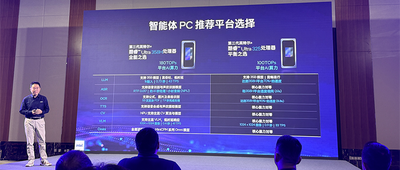
來抄作業!智能體PC應用的多種玩法,英特爾一口氣曬了個遍
英特爾與騰訊、百度、榮耀等合作夥伴展示智能體PC在辦公、娛樂、遊戲、教育等場景的20餘項落地應用,強調混合AI部署、模型路由與內存優化等技術。英特爾提出三大路徑實現端雲協同的「微笑曲線」,並推動Skills生態建設,讓智能體PC成為AI時代的新入口。

2026最值得期待的AI硬件,是卡片
微軟在今年的開發者大會 Build 2026 上,端出了一個名為 Project Solara 的 AI 硬體方案,瞬間引發大量關注。不過,這並不是外界猜測的 AI 手機,也不是單純把 Copilot 塞進新裝置;微軟真正的盤子,是透過這套計畫,為企業打造一套可複製的「行業用 AI 方案模板」。Project Solara 的核心是一套輕量化、便於企業集群管理的設備系統,搭配微軟設備生態平臺(MDEP),再串接 Azure 託管的智能體服務,目標客戶鎖定百思買、李維斯、塔吉特等大型 B 端夥伴。

鄔賀銓院士:2030 年國內對話類 Token 流量將下降至 12%,智能體服務流量佔比升至 75%
首頁 > 智能時代>人工智能 鄔賀銓院士:2030 年國內對話類 Token 流量將下降至 12%,智能體服務流量佔比升至 75% 2026/7/8 16:11:08 來源:新浪科技 作者:- 責編:汪淼 評論: 7 月 8 日上午消息,2026 中國互聯網大會今日開幕,中國工程院院士、中國互聯網協會原理事長、中國工程院原副院長鄔賀銓發表題為《AI 原生重構互聯網》的主題演講。

AI把代碼寫崩,再花1周1萬美元請人用AI修:Vibe Coding的荒誕閉環出現了
賬號設置我的關注我的收藏申請的報道退出登錄登錄搜索36氪Auto數字時氪未來消費智能湧現未來城市啟動Power on36氪出海36氪研究院潮生TIDE36氪企服點評36氪財經職場bonus36碳後浪研究所暗湧Waves硬氪氪睿研究院媒體品牌企業號企服點評36Kr研究院36Kr創新諮詢企業服務核心服務城市之窗政府服務創投發佈LP源計劃VClubVClub投資機。
連支付寶“碰一下”都被Agent了
智東西 作者 | 李水青 編輯 | 心緣 智東西7月8日報道,今日,支付寶宣佈“碰一下” 完成AI升級:開放Agent網絡,將每一臺“碰一下”設備升級為Agent,推出業界首個碰設備Agent“曉雨”,上線平臺補貼、政府補貼、收銀有獎、爆品推廣等八大經營Skill等服務。 簡單來說,完成升級後,用戶用手機碰一下商家“碰一下”設備,即可運行多種Agent服務。