Building a Code Dataset Pipeline from NVIDIA Nemotron-Pretraining-Code-v3 Metadata with Streaming, Pandas, and tiktoken
重點摘要
In this tutorial, we work with NVIDIA’s Nemotron-Pretraining-Code-v3 dataset as a large-scale metadata index for code pretraining research. Instead of downloading the full multi-gigabyte dataset, we stream it, inspect its schema, and build a manageable sample for analysis. We then explore the dataset by studying languages, file extensions, repository frequency, and directory depth, which helps us understand how the index is structured. After that, we reconstruct the raw GitHub URLs from the metadata, attempt to fetch the actual source files, and estimate the token scale of the fetched code. By the end of the workflow, we create a reusable filtered sample and save processed outputs for further experimentation. Streaming the NVIDIA Nemotron-Pretraining-Code-v3 Dataset and Inspecting Its Sche
In this tutorial, we work with NVIDIA’s Nemotron-Pretraining-Code-v3 dataset as a large-scale metadata index for code pretraining research. Instead of downloading the full multi-gigabyte dataset, we stream it, inspect its schema, and build a manageable sample for analysis. We then explore the dataset by studying languages, file extensions, repository frequency, and directory depth, which helps us understand how the index is structured. After that, we reconstruct the raw GitHub URLs from the metadata, attempt to fetch the actual source files, and estimate the token scale of the fetched code. By the end of the workflow, we create a reusable filtered sample and save processed outputs for further experimentation. Streaming the NVIDIA Nemotron-Pretraining-Code-v3 Dataset and Inspecting Its Schema Copy CodeCopiedUse a different Browser!pip -q install -U "datasets>=2.19" huggingface_hub tiktoken pyarrow 2>/dev/null import os, io, time, itertools, collections, textwrap, math import pandas as pd import requests import matplotlib.pyplot as plt from datasets import load_dataset, get_dataset_config_names REPO_ID = "nvidia/Nemotron-Pretraining-Code-v3" pd.set_option("display.max_colwidth", 80) configs = get_dataset_config_names(REPO_ID) CONFIG = configs[0] print(f"Configs available : {configs}") print(f"Using config : {CONFIG}") stream = load_dataset(REPO_ID, CONFIG, split="train", streaming=True) print("\nFeatures / schema:") print(stream.features) print("\nFirst raw record:") print(next(iter(stream))) We set up the Colab environment by installing the required libraries and importing the tools needed for dataset streaming, analysis, and visualization. We define the NVIDIA Nemotron-Pretraining-Code-v3 dataset ID, discover the available dataset configuration, and load the training split in streaming mode. We also inspect the dataset schema and print the first record to understand the structure before conducting deeper analysis. Building a Shuffled Sample and Analyzing Code Metadata Features Copy CodeCopiedUse a different BrowserN_SAMPLE = 30_000 shuffled = stream.shuffle(seed=42, buffer_size=20_000) t0 = time.time() rows = list(itertools.islice(shuffled, N_SAMPLE)) df = pd.DataFrame(rows) print(f"\nPulled {len(df):,} rows in {time.time()-t0:,.1f}s") print(df.head(10)) print("\nColumns:", list(df.columns), "| memory:", f"{df.memory_usage(deep=True).sum()/1e6:,.1f} MB") df["ext"] = df["rel_path"].str.extract(r"\.([A-Za-z0-9_]+)$")[0].str.lower() df["depth"] = df["rel_path"].str.count("/") df["fname"] = df["rel_path"].str.rsplit("/", n=1).str[-1] print("\n--- Top 15 languages (sample) ---") lang_counts = df["language"].value_counts() print(lang_counts.head(15)) print("\n--- Top 15 file extensions (sample) ---") print(df["ext"].value_counts().head(15)) print("\n--- Most frequent repositories (sample) ---") print(df["repo"].value_counts().head(10)) print("\n--- Path-depth summary ---") print(df["depth"].describe()) print(f"\nUnique repos in sample : {df['repo'].nunique():,}") print(f"Unique languages : {df['language'].nunique():,}") We create a shuffled sample from the streamed dataset so that we do not rely only on the first clustered rows. We convert the sampled records into a Pandas DataFrame and derive useful features such as file extension, path depth, and file name. We then examine the most common languages, file extensions, repositories, and path-depth statistics to better understand the sampled metadata. Visualizing Languages, File Extensions, Directory Depth, and Repository Frequency Copy CodeCopiedUse a different Browserfig, ax = plt.subplots(2, 2, figsize=(14, 9)) lang_counts.head(12).iloc[::-1].plot.barh(ax=ax[0, 0], color="#76b900") ax[0, 0].set_title("Top 12 languages (sample)"); ax[0, 0].set_xlabel("files") df["ext"].value_counts().head(12).iloc[::-1].plot.barh(ax=ax[0, 1], color="#5b8def") ax[0, 1].set_title("Top 12 file extensions (sample)"); ax[0, 1].set_xlabel("files") df["depth"].clip(upper=12).plot.hist(bins=range(0, 14), ax=ax[1, 0], color="#f4a261", edgecolor="white") ax[1, 0].set_title("Directory nesting depth"); ax[1, 0].set_xlabel("'/' count in path") (df["repo"].value_counts().head(10).iloc[::-1] .plot.barh(ax=ax[1, 1], color="#9b5de5")) ax[1, 1].set_title("Most common repos (sample)"); ax[1, 1].set_xlabel("files") plt.tight_layout(); plt.show() We visualize the main patterns found in the sampled metadata using multiple plots. We compare the top languages, top file extensions, directory nesting depth, and most frequent repositories in the sample. We use these charts to make the dataset easier to interpret and to quickly identify dominant structures inside the metadata index. Reconstructing Raw GitHub URLs and Fetching Real Source Files Copy CodeCopiedUse a different Browserdef raw_url(repo: str, commit_id: str, rel_path: str) -> str: from urllib.parse import quote return (f"https://raw.githubusercontent.com/{repo}/{commit_id}/" f"{quote(rel_path)}") df["raw_url"] = df.apply(lambda r: raw_url(r.repo, r.commit_id, r.rel_path), axis=1) print("\nExample reconstructed URLs:") for u in df["raw_url"].head(5): print(" ", u) def fetch_code(url: str, max_bytes: int = 200_000, timeout: int = 10): try: resp = requests.get(url, timeout=timeout) if resp.status_code == 200 and len(resp.content) <= max_bytes: return resp.text return None except requests.RequestException: return None print("\n--- Attempting to fetch a few real files ---") fetched, attempts = [], 0 for _, r in df.sample(frac=1, random_state=1).iterrows(): if len(fetched) >= 5: break attempts += 1 code = fetch_code(r["raw_url"]) status = "OK " if code else "MISS" print(f"[{status}] {r['language']:<12} {r['repo']}/{r['rel_path']}") if code: fetched.append({**r.to_dict(), "code": code, "n_chars": len(code)}) print(f"\nFetched {len(fetched)} files in {attempts} attempts " f"(misses are normal — repos get deleted/renamed).") if fetched: ex = fetched[0] print(f"\n----- PREVIEW: {ex['repo']}/{ex['rel_path']} ({ex['language']}) -----") print(textwrap.shorten(ex["code"].replace("\n", " "), width=600, placeholder=" ...[truncated]")) We reconstruct raw GitHub URLs from the metadata: the repository name, commit ID, and relative file path. We then attempt to fetch a few real source files from GitHub, gracefully handling missing, deleted, private, or oversized files. We preview one successfully fetched file to see how the metadata index connects back to the actual code content. Filtering Python Files, Estimating Token Scale, and Saving Outputs Copy CodeCopiedUse a different BrowserTARGET_LANG = "Python" py_index = df[df["language"] == TARGET_LANG].copy() print(f"\n{TARGET_LANG} files in sample: {len(py_index):,}") try: import tiktoken enc = tiktoken.get_encoding("cl100k_base") tok = lambda s: len(enc.encode(s, disallowed_special=())) except Exception: tok = lambda s: max(1, len(s) // 4) if fetched: toks = [tok(f["code"]) for f in fetched] print(f"Fetched-file tokens: total={sum(toks):,} " f"mean={sum(toks)/len(toks):,.0f}/file") TOTAL_FILES, TOTAL_TOKENS = 146_323_609, 173e9 print(f"\nFull-dataset scale (per NVIDIA card): " f"{TOTAL_FILES:,} files ≈ {TOTAL_TOKENS/1e9:.0f}B tokens " f"(~{TOTAL_TOKENS/TOTAL_FILES:,.0f} tokens/file).") df.to_parquet("nemotron_code_v3_sample.parquet", index=False) if fetched: pd.DataFrame(fetched).to_json("nemotron_fetched_code.jsonl", orient="records", lines=True) print("\nSaved: nemotron_code_v3_sample.parquet" + (", nemotron_fetched_code.jsonl" if fetched else "")) print("Done ") We filter the sampled index for Python files and estimate token counts for successfully fetched files. We use tiktoken when available and fall back on a simple character-based estimate when it is not. Also, we save the processed metadata sample and the fetched code outputs so we can reuse them later without having to stream the dataset again. Conclusion In conclusion, we built a practical end-to-end workflow to understand and use the Nemotron-Pretraining-Code-v3 metadata index. We learned how to s
Related
相關文章

AI預測不了“佛得角”
AI預測模型在世界盃足球賽預測中集體失準,特別是對非洲隊伍「佛得角」的表現完全錯估,凸顯大模型在面臨動態不確定性與非主流聯賽數據不足時的脆弱性。這場預測翻車事件引發外界對AI可信度的質疑,也促使科技公司反思如何修正模型,導入即時動態資訊以提升預測準確度。

智能家居終於“智能”了!有記憶、能認人的“賈維斯”,小米先交卷了
{"id":"bfc7e789-db52-4597-89dc-85a30161bd27","object":"response","model":"deepseek-v4-flash","output":[],"stop_reason":"max_output_tokens","usage":{"input_tokens":158,"output_tokens":1400,"total_to...

AI 讓獨立遊戲更容易做出來,也更容易死在 Steam 裡
AI 降低了獨立遊戲的生產門檻,也放大了 Steam 供給過剩和玩家信任危機。獨立遊戲的競爭,正在從“能不能做出來”,轉向“能不能被看見、被相信、被持續選擇”。當工具讓內容越來越容易生成,真正稀缺的反而是人的表達、真實反饋、發行篩選與社區信任。

全球首個 AI 藝術博物館:谷歌協力打造,生成 12 億像素超現實畫面
谷歌昨日(6 月 18 日)發佈博文,宣佈攜手藝術家 Refik Anadol,在洛杉磯打造全球首個 AI 藝術博物館 Dataland,將於明日(6 月 20 日)開館。

八部門聯合發文力推“人工智能 + 消費”,擴大 AI 手機電腦及智能網聯汽車消費
商務部等八部門聯合印發《關於加快“人工智能 + 消費”發展的實施意見》,提出 5 方面 17 條舉措,旨在擴大智能產品消費、賦能服務消費、創新消費場景。政策將推動人工智能與消費深度融合,促進 AI 進千家萬戶。#人工智能消費新政##AI 手機電腦##智能網聯汽車#
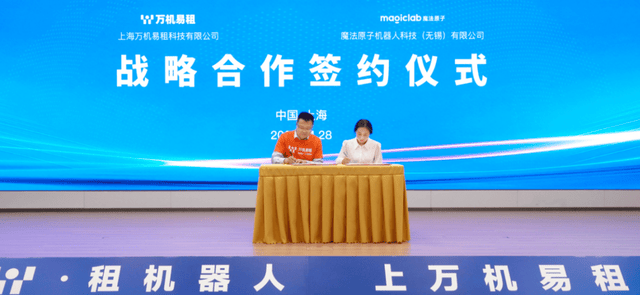
魔法原子牽手萬機易租,全棧產品入駐2.0平臺共建租賃生態
這篇消息聚焦「魔法原子牽手萬機易租,全棧產品入駐2.0平臺共建租賃生態」。原始導語提到:全系產品入駐萬機易租2.0 從 AI 情報角度來看,這類內容值得關注其背後的技術進展、產品落地、產業競爭與後續市場影響。